Affichage des articles dont le libellé est Flex. Afficher tous les articles

mercredi 30 mars 2011

GraniteDS, Java EE 6 and Seam 3 at JAXLondon 2011

I really enjoy going to London for JAX 2011. I will be speaking about Flex and Java EE 6.
The timing is very interesting because Java EE 6 is now really getting a lot of traction (don't miss the sessions of the Java EE day) and the final Seam 3.0 is about to be released. I will be able to demonstrate some nice new stuff with Flex, GraniteDS and Seam 3.
I'm also happy to speak just after the keynote of Michaël Chaize from Adobe who will certainly show lots of awesome Flash & Flex demos on various mobile platforms.
If I can find enough time, I'll try to also do a short demonstration of a multiscreen Flex/AIR application on an Android phone.


See you there !

mercredi 6 octobre 2010

Presentation of GraniteDS at 360|Flex DC

Franck and I were at the 360|Flex DC conference in September to give a presentation about GraniteDS. It was a very interesting time for us, as it was our first talk in the US and our first talk in a pure Flash/Flex conference. We met nice people there and it was a refreshing change to attend to sessions made by designers about user experience, visual effects and gaming instead of our usual boring enterprise Java stuff. Thanks again to John & Nicole for inviting us.

Our presentation was partly slides and partly demo code and some people asked if we could publish the demo application. After a bit of polishing, it is now available for download. There is an ear that can be deployed in a vanilla JBoss 4.2.3, and the eclipse project with the complete source code and configuration here.

Note that you will need two things in JBoss to run the example :
- Install APR (Apache Portable Runtime): download and install it from here, see install doc here.
- Comment out the "CommonHeadersFilter" section in jboss-4.2.3.GA/server/default/deploy/jboss-web.deployer/conf/web.xml:
<!--
<filter>
<filter-name>CommonHeadersFilter</filter-name>
<filter-class>org.jboss.web.tomcat.filters.ReplyHeaderFilter</filter-class>
<init-param>
<param-name>X-Powered-By</param-name>
<param-value>Servlet 2.4; JBoss-4.2.3.GA [...]</param-value>
</init-param>
</filter>

<filter-mapping>
<filter-name>CommonHeadersFilter</filter-name>
<url-pattern>/*</url-pattern>
</filter-mapping>
-->

Once deployed, it can be accessed from http://localhost:8080/gds-onlinebet/Onlinebet.html.

This demo will probably be included in the distribution examples in the next release of GraniteDS.

Finally if you are interested by the slides, they are available on SlideShare.

As always, don't hesitate to give your feedback.

mardi 7 avril 2009

What's new in GraniteDS 2.0

GraniteDS 2.0 beta 2 has just been released, and is almost feature complete. There will probably be a 2.0 RC adding the only important missing feature (OSGi support), and then we shoud be ready for the final release. This post only describes the most important new features in this release, but this beta 2 also contains a whole lot of bug fixes and improvements since the 1.2 release.

New packaging

As stated in the migration notes, the most visible change is the completely new packaging of the libraries and examples. The persistence/lazy loading support has been completely refactored to simplify the support of new JPA/JDO providers. Consequently the Flex swc libraries have no more dependency on the server-side persistence technology. There are now only 2 swcs: 'granite-essentials.swc' that includes the minimal mandatory persistence classes and must be linked with -include-library, and 'granite.swc' which can be linked as a standard Flex library. This new packaging should allow for smaller compiled swfs as the Flex compiler can now decide which classes need to be included. Finally the Tide framework libraries has been merged in the 'normal' GDS libraries, both client side and server side.

Improved example projects

The example projects have been improved and are included in the main distribution, in the 'examples' folder. Here is the list of these examples :
  • graniteds_pojo: most simple one with a basic POJO session service and a MXML calling a RemoteObject
  • graniteds_chat: simple chat example demonstrating use of Gravity to handle near real-time communication between Flex clients
  • graniteds_ejb3: simple address book with EJB3/JPA services
  • graniteds_spring: simple address book with Spring/JPA services. Also shows integration with Spring security
  • graniteds_guice: simple CRUD application with Guice/WARP services
  • graniteds_tide_ejb3/graniteds_tide_spring/graniteds_tide_seam: same address book with EJB3/JPA, Spring/Hibernate or Seam/JPA. Shows the Tide client framework, paged collections, lazy loading, client-side authorization integration and multiuser data updates (you can see it by opening different browser on the application). The Seam example uses the new typed event model of GDS 2.0. The Tide/EJB3 and Tide/Spring examples now have a deployment configuration that allow to deploy them in GlassFish V2 with the TopLink JPA provider.
  • seam_flexbooking: completely rewritten example that exactly reproduces the look and behaviour of the original Seam example. Shows the use of the Tide client framework, and use of client-side conversations integrated with Seam conversations. This is the most advanced example for demonstrating the tight integration with Seam.
Support for more server platforms

The core GraniteDS supports new JPA providers and application servers. More specifically GlassFish V2 and V3 with Hibernate or TopLink/EclipseLink are now viable deployment platforms, even without specific Gravity integration.
JPA provider integration :
  • Hibernate
  • TopLink
  • EclipseLink
  • OpenJPA (new in 2.0)
  • DataNucleus/JPOX (new in 2.0)
Security integration :
  • Tomcat 6
  • Jetty 6
  • JBossWeb (with the Tomcat security service)
  • WebLogic (new in 2.0)
  • GlassFish V2
  • GlassFish V3 (new in 2.0)
Gravity server push :
  • Tomcat 6 Comet
  • JBoss 5/JBossWeb comet events
  • Jetty 6 continuations
  • Any other application server without comet support with Jetty servlet and jetty-util.jar
There have been also a lot of improvements in the Tide framework, in the client framework itself and also in the integration with server frameworks.

Tide/Client framework

- UI components defined in MXML can now be automatically registered in the Tide context. A preinitialize handler should be defined in the main application and call Seam.getInstance().initApplication() / Spring.getInstance().initApplication() / Ejb.getInstance().initApplication(). The main MXML is then registered in the Tide context and all children MXML annotated with [Name] will be registered automatically in the context with their component name (or with the name provided in the annotation). For example:

<mx:Application preinitialize="Seam.getInstance().initApplication()">
<Login id="loginUI"/>
</mx:Application>

Login.mxml :
<mx:Panel xmlns:mx="http://www.adobe.com/2006/mxml">
<mx:Metadata>
[Name]
</mx:Metadata>
<mx:Script>

<![CDATA[
import org.granite.tide.seam.security.Identity;

[Bindable] [In]
public var identity:Identity;

[Bindable]
public var message:String = null;

private function tryLogin(username:String, password:String):void {
identity.username = username;
identity.password = password;
identity.login();
}
]]>
</mx:Script>

<mx:Text htmlText="<i>(Type in user/user or admin/admin)</i>" textAlign="center"/>

<mx:Form>
<mx:FormItem label="Username">
<mx:TextInput id="username"/>
</mx:FormItem>
<mx:FormItem label="Password">
<mx:TextInput id="password" displayAsPassword="true"
enter="tryLogin(username.text, password.text);"/>
</mx:FormItem>
</mx:Form>

<mx:Text text="{message}" textAlign="center"/>

<mx:Button label="Login"
click="tryLogin(username.text, password.text);"/>
</mx:Panel>

Here the Login.mxml will be registered in the Tide context with the name 'loginUI'. That means that it can be injected with the [In] annotation and dispatch Tide events. The name can be overriden with [Name("someName")]. It is also possible to specify a conversation scope with [Name("someName", scope="conversation")], in this case the component will not be registered automatically but will still have to be set in the conversation context with tideContext.someName = theComponent.

- The Tide framework supports a new typed event model that can be optionally used instead of TideUIEvent/TideUIConversationEvent. Any Flex event can now be dispatched by the UI components, but their types have to be specified in an Event annotation (and of course the Event annotation must be kept in the Flex compiler options).
<mx:Panel xmlns:mx="http://www.adobe.com/2006/mxml">
<mx:Metadata>
[Name]
[Event(name="login")]
</mx:Metadata>
<mx:Script>

<![CDATA[
[Bindable]
public var message:String = null;
]]>
</mx:Script>

<mx:Text htmlText="<i>(Type in user/user or admin/admin)</i>" textAlign="center"/>

<mx:Form>
<mx:FormItem label="Username">
<mx:TextInput id="username"/>
</mx:FormItem>
<mx:FormItem label="Password">
<mx:TextInput id="password" displayAsPassword="true"
enter="dispatchEvent(new LoginEvent(username.text, password.text))"/>
</mx:FormItem>
</mx:Form>

<mx:Text text="{message}" textAlign="center"/>

<mx:Button label="Login"
click="dispatchEvent(new LoginEvent(username.text, password.text))"/>
</mx:Panel>

With the LoginEvent class:
    public class LoginEvent extends Event {

public var username:String;
public var password:String;


public function LoginEvent(username:String, password:String):void {
super("login", true, true);
this.username = username;
this.password = password;
}

public override function clone():Event {
return new LoginEvent(username, password);
}
}

A client component can then register an observer with this event type :
[Observer("login")]
public function loginHandler(event:LoginEvent):void {
...
}

Such events can also trigger client conversations by implementing org.granite.tide.events.IConversationEvent that requires a property getter conversationId (that defines the conversationId and replaces the first argument of TideUIConversationEvent).

Tide/Seam

- There have been some improvements in the interactions between Tide client conversations and Seam server conversations. Tide is now able to detect when the conversationId has been changed on the server or when a new conversation has begun. There are also two new client components ConversationList and Conversation that are client counterparts to the Seam components. ConversationList is a list of currently existing Seam conversation and Conversation can be used for example to set a description on the current conversation, in case you need interoperability between Flex-initiated conversations and classic Web-initiated Seam conversations.

- The client-side status messages has been improved and Tide now supports control specific messages. A client component StatusMessages can be injected and has a messages property (which replaces context.messages) and a controlMessages property that is a map of messages keyed by controlId. A new client-side validator allows to bind such control messages to Flex UI components. A (minor) beneficial side-effect of this change is also that you can now have a context variable named 'messages'.

These new features are used in the new Seam booking example.

Tide/Spring/Grails

Spring integration was relatively lacking in some parts compared to the Seam integration. GDS 2.0 brings many new features in the Tide/Spring integration.

- Tide/Spring now supports Spring MVC controllers (only annotation-based) besides the existing support for pure services. That allows for easy binding between server-provided data and the Flex application. All model variables returned from a controller's ModelAndView are bound to Tide context variable, and thus can be directly injected and bound to UI components.
<mx:Application preinitialize="Spring.getInstance().initApplication()">
<mx:Script>
[In] [Bindable]
public var people:ArrayCollection;

[In]
public var peopleController:Object;
</mx:Script>

<mx:VBox>
<mx:DataGrid dataProvider="{people}">
<mx:columns>
<mx:DataGridColumn dataField="name"/>
</mx:columns>
</mx:DataGrid>

<mx:TextInput id="searchString"/>
<mx:Button label="Get list" click="peopleController.list({searchString: searchString.text})"/>
</mx:VBox>
</mx:Application>

Spring controller:
@Controller("peopleController")
@Transactional
public class PeopleController {

protected SessionFactory sessionFactory;

@Autowired
public void setSessionFactory(SessionFactory sessionFactory) {
this.sessionFactory = sessionFactory;
}

@Transactional
@RequestMapping("/people/list")
public ModelMap createPerson(@RequestParam("searchString") String searchString) {
List people = sessionFactory.currentSession()
.createQuery("select p from Person p where p.name like :searchString")
.setString("searchString", searchString)
.list();
return new ModelMap("people", people);
}
}

- The Spring integration has also been extended to support Grails controllers and services. The Grails integration is available as a Grails plugin (plugin page here: http://www.grails.org/plugin/gdsflex). See previous blog entries for a detailed tutorial on the usage of the plugin.

- Also there is now support for client-side integration with Spring security authorization. The Tide Identity component now has 4 new methods, ifAllGranted, ifAnyGranted, ifNotGranted and hasPermission that can be used to show/hide various parts of the UI depending on the UI rights. The method names are stricly copied from the Spring security JSP tag library. The ifSomethingGranted(roleNames) are straightforward and take a comma separated list of role names. The hasPermission(entity, action) can be used to protect access to individual entities when using Spring security ACLs on the server.
These new methods require the configuration of a server-side identity component on the Spring context :
<bean id="identity" class="org.granite.tide.spring.security.Identity"/>

or to handle ACLs :
<bean id="identity" class="org.granite.tide.spring.security.AclIdentity"/>


The last important new feature is the multiuser data update but it's relatively complex and there will be a blog entry about it later.

lundi 6 avril 2009

Building a Flex multi-tab CRUD application : adding security and server push

The first part of this article has described how to build the main application. The goal of this second part is to demonstrate how you can easily add security and collaborative updates to this existing application with the gdsflex 0.3 Grails plugin.

Before anything, we need to upgrade the previous project to the latest gdsflex plugin release 0.3 with :
grails install-plugin gdsflex

The usual way of adding security to a Grails application is to use the Acegi/Spring security Grails plugin. So now we have to setup this plugin.
grails install-plugin acegi

grails create-auth-domains User Role Requestmap

grails generate-manager

This will install the plugin and generate a set of gsp pages to create roles and users. Now browse http://localhost:8080/gdsexample/role/create, and create 2 roles ROLE_ADMIN and ROLE_USER. Then http://localhost:8080/gdsexample/user/create, and create 2 users admin and user, each one with one of the previously created roles. The names of the roles are important for Spring security and have to start with 'ROLE_'.

We also have to enable the Spring security integration in the GraniteDS config file:

web-app/WEB-INF/granite/granite-config.xml, uncomment or add the following line:
<security type="org.granite.messaging.service.security.SpringSecurityService"/>

Once this setup is done, we have to define a login page in the Flex application. To do this, we will simply add a ViewStack in the main MXML that will display either the login page or the application depending on the user login state. This ViewStack will be bound to the Tide Identity component that handles user authentication :

grails-app/views/GDSExample.mxml :
<?xml version="1.0" encoding="utf-8"?>

<mx:Application
xmlns:mx="http://www.adobe.com/2006/mxml"
xmlns="*"
layout="vertical"
backgroundGradientColors="[#0e2e7d, #6479ab]"
preinitialize="Spring.getInstance().initApplication()">

<mx:Script>
<![CDATA[
import org.granite.tide.spring.Spring;
import org.granite.tide.validators.ValidatorExceptionHandler;
import org.granite.tide.spring.Identity;
import org.granite.tide.events.TideResultEvent;
import org.granite.tide.events.TideFaultEvent;

Spring.getInstance().addExceptionHandler(ValidatorExceptionHandler);

[Bindable] [In]
public var identity:Identity;


[Bindable]
private var message:String;

private function loginResult(event:TideResultEvent):void {
message = "";
}

private function loginFault(event:TideFaultEvent):void {
message = event.fault.faultString;
}
]]>
</mx:Script>

<mx:ViewStack id="appView" selectedIndex="{identity.loggedIn ? 1 : 0}" width="100%" height="100%">

<mx:VBox width="100%" height="100%" verticalAlign="middle" horizontalAlign="center" >
<mx:Panel title="Login"
horizontalAlign="center"
verticalGap="0" paddingTop="8" paddingBottom="8"
xmlns:mx="http://www.adobe.com/2006/mxml">

<mx:Form>
<mx:FormItem label="Username">
<mx:TextInput id="username"/>
</mx:FormItem>
<mx:FormItem label="Password">
<mx:TextInput id="password" displayAsPassword="true"
enter="identity.login(username.text, password.text, loginResult, loginFault);"/>
</mx:FormItem>
</mx:Form>

<mx:Label text="{message}"/>

<mx:Button label="Login"
click="identity.login(username.text, password.text, loginResult, loginFault);"/>
</mx:Panel>
</mx:VBox>

<mx:VBox id="mainUI" width="100%">
<mx:ApplicationControlBar id="acb" width="100%">
<mx:Label text="GraniteDS / Grails example" fontSize="18" fontWeight="bold" color="#f0f0f0"/>
<mx:Button label="Logout" click="identity.logout()"/>
</mx:ApplicationControlBar>

<BookUI id="bookUI" width="100%" height="100%"/>
</mx:VBox>

</mx:ViewStack>
</mx:Application>

As you can see, most of the code we have added is the login form. The authentication is completely handled by the Identity component. Here we make use of its two main methods login / logout and of its loggedIn property that is bindable and is here used to select which view is displayed. We also define a fault handler to display a login error message when the entered credentials are not correct.

You can check now on http://localhost:8080/gdsexample/GDSExample.swf that only authenticated people can see and change existing data.

To further refine the security of the application, we could decide that only administrators are allowed to delete books in our database. This can be done server-side with Spring security, but here we'll just see how to modify the UI according to the user access rights. This is not enabled by default in the plugin, we just have to change the plugin settings, and add a GraniteDSConfig.groovy in grails-app/conf:

grails-app/conf/GraniteDSConfig.groovy :
graniteConfig {

springSecurityAuthorizationEnabled = true

}

Then we have to make a few changes in the MXML UI to hide the Delete button when the user is not an administrator:

grails-app/views/BookEdit.mxml :

import org.granite.tide.spring.Identity;

[Bindable] [In]
public var identity:Identity;


<mx:HBox>
<mx:Button label="Save" click="save()"/>
<mx:Button label="Delete"
enabled="{!create}"
visible="{identity.ifAllGranted('ROLE_ADMIN')}"
click="remove()"/>
<mx:Button label="Cancel" click="cancel()"/>
</mx:HBox>

You can check that if you don't log in with a user having the ROLE_ADMIN role, you don't have the Delete button. You should of course also enable server-side Spring security (for example with the @Secured annotation) and define a AccessDeniedExceptionHandler that would catch all security errors to display a uniform message (see the documentation or GDS/Tide/Spring example for more information).
The Identity component provides 4 bindable boolean methods ifAllGranted, ifNotGranted, ifAnyGranted and hasPermission corresponding to the JSP tags available in the Spring security tag library. The hasPermission is not supported right now by the Grails plugin but it depends on the configuration of Spring security ACLs that itself would probably require a complete article.

To finish this post, we will add real-time multiuser updates by adding the Gravity push functionality to our application. First we have to enable these functionalities in the plugin settings:

grails-app/conf/GraniteDSConfig.groovy :
graniteConfig {

springSecurityAuthorizationEnabled = true

gravityEnabled = true

dataDispatchEnabled = false
}

Then we have to define a Gravity channel and topic in the services-config.xml Flex configuration:

web-app/WEB-INF/flex/services-config.xml:
<services-config>

<services>
<service id="granite-service"
class="flex.messaging.services.RemotingService"
messageTypes="flex.messaging.messages.RemotingMessage">

<destination id="spring">
<channels>
<channel ref="my-graniteamf"/>
</channels>
<properties>
<factory>tideSpringFactory</factory>
<persistenceManagerBeanName>tidePersistenceManager</persistenceManagerBeanName>
</properties>
</destination>
</service>

<service id="gravity-service"
class="flex.messaging.services.MessagingService"
messageTypes="flex.messaging.messages.AsyncMessage">
<adapters>
<adapter-definition id="simple" class="org.granite.gravity.adapters.SimpleServiceAdapter"/>
</adapters>

<destination id="bookManagerTopic">
<properties>
<session-selector>true</session-selector>
</properties>
<channels>
<channel ref="my-gravityamf"/>
</channels>
<adapter ref="simple"/>
</destination>
</service>
</services>

<factories>
<factory id="tideSpringFactory" class="org.granite.tide.spring.SpringServiceFactory">
</factory>
</factories>

<!--
! Declares my-graniteamf channel.
!-->
<channels>
<channel-definition id="my-graniteamf" class="mx.messaging.channels.AMFChannel">
<endpoint
uri="http://{server.name}:{server.port}/{context.root}/graniteamf/amf"
class="flex.messaging.endpoints.AMFEndpoint"/>
</channel-definition>

<channel-definition id="my-gravityamf" class="org.granite.gravity.channels.GravityChannel">
<endpoint
uri="http://{server.name}:{server.port}/{context.root}/gravityamf/amf"
class="flex.messaging.endpoints.AMFEndpoint"/>
</channel-definition>
</channels>

</services-config>

Here we have just added a new channel-definition, gravity-service and topic destination in the configuration, now we have to tell the Flex client and the Grails components to send/receive the data updates on this topic. The server part is relatively simple, we just have to annotate our controllers/services with the DataEnabled annotation:
@DataEnabled(topic="bookManagerTopic", params=ObserveAllPublishAll.class, publish=DataEnabled.PublishMode.ON_SUCCESS)

This annotation specifies the topic and has two other important parameters:

- 'params' defines a publishing selection class. To keep things simple here, we will just write a very simple selection class that allow everyone to observer and publish all updates. For some reason, using Groovy classes in annotations triggers an infinite loop in the Grails compilation, so we will just write a Java class this time:

src/java/ObserveAllPublishAll.java
import org.granite.tide.data.DataObserveParams;
import org.granite.tide.data.DataPublishParams;
import org.granite.tide.data.DataTopicParams;

public class ObserveAllPublishAll implements DataTopicParams {

public void observes(DataObserveParams params) {
// Define key/value pairs that the client is able to observe
// Will be used to construct the topic selector for the client calling the component
}

public void publishes(DataPublishParams params, Object entity) {
// Define key/value pairs to add in the published message headers
// Will be used to match against the topic selector of the subscribed clients
}
}

- 'publish' defines the publishing mode. ON_SUCCESS indicates that all remote calls on annotated components that do not trigger exceptions will dispatch the corresponding entity updates. In general you will want to have more control on the dispatching and use the MANUAL mode to be sure that updates are dispatched only on transaction success and include the dispatch in a Grails interceptor. We could also have used a transactional JMS topic to have a real transactional behaviour. Let's keep it simple for this example.

On Flex side, you then have to add the data observer component in the main MXML:

grails-app/views/GDSExample.mxml :
            import org.granite.tide.data.DataObserver;

// Register a data observer component with the name of the topic
Spring.getInstance().addComponent("bookManagerTopic", DataObserver);
// Binds the subscribe and unsubscribe methods of the component to the application login/logout events
Spring.getInstance().addEventObserver("org.granite.tide.login", "bookManagerTopic", "subscribe");
Spring.getInstance().addEventObserver("org.granite.tide.logout", "bookManagerTopic", "unsubscribe");

[In]
public var bookManagerTopic:DataObserver;

An interesting thing here is how you can bind a Tide event to any Tide component method, allowing for a complete decoupling between the component and the application.

Now if you open two browsers on the Flex application (in different http sessions, so for example you can try with one Firefox and one Internet Explorer, or better on two different machines), you can check that updates saved on one browser are (almost) immediately visible on the other.

If you look at the console, you will most likely see a lot of error stack traces concerning some RetryRequest error. This has something to do with some Grails filter logging the Jetty continuation retry exception. That's not extremely important, and it will be addressed in a later release. These configuration aspects of Gravity and other advanced features will also be improved to avoid having many places where to change configuration and centralize most of it in the GraniteDSConfig.groovy file.


Now we've seen a simple use of most features of GraniteDS. The complete project is available [here|http://www.graniteds.org/confluence/download/attachments/9371677/gdsexample-0.3.zip] and can be unzipped after having created the project and installed the various plugins (also remember to create roles and user otherwise you won't be able to log in).
We could have implemented the server side with any other Java server technology supported out-of-the-box by GDS/Tide (JBoss Seam, Spring, EJB3) with minimal change on the Flex side, but the Grails/GraniteDS combination seems a good choice to quickly develop Flex applications with a Java server backend.

lundi 30 mars 2009

Building a Flex multi-tab CRUD application with the Grails GraniteDS plugin

Granite Data Services provides a complete platform for building Flex RIAs with a Java backend. I'm going to show how to build a simple multi-tab CRUD application in a few steps. GraniteDS 2.0 brings a lot of improvements in the Spring integration and now supports Grails with a specific plugin. The Flex/Grails/GraniteDS combination is very efficient and makes building applications quite fast, that's why I will build the backend with Grails. Moreover it makes extremely easy to create and setup the project. We could also have built the backend with Spring or JBoss Seam with very few changes in the Flex application itself.

We start by creating a new Grails application with the GDSFlex plugin (now at version 0.2), assuming Grails 1.1 is installed somewhere :
grails create-app gdsexample
cd gdsexample
grails install-plugin gdsflex

The main part of the job is to define our model. We are going to build a very simple book manager, so we will need two Book and Chapter domain classes.
grails create-domain-class Book
grails create-domain-class Chapter

These domain classes are empty for now so let's add a few properties.

grails-app/domain/Book.groovy
import javax.persistence.*

@Entity
class Book {

static constraints = {
title(size:0..100, blank:false)
}

@Id
Long id

@Version
Integer version

String uid

String title

String author

String description

Set<Chapter> chapters
static hasMany = [chapters:Chapter]
static mapping = {
chapters cascade:"all,delete-orphan"
}
}

grails-app/domain/Chapter.groovy :
import javax.persistence.*

@Entity
class Chapter {

static constraints = {
title(size:0..100, blank:false)
}

@Id
Long id

@Version
Integer version

String uid

Book book

String title

String summary
}

You can notice that these are not pure GORM entities. GraniteDS requires at least the 3 JPA annotations @Entity, @Id and @Version to be able to correctly generate the AS3 classes. This is the only restriction on the domain classes and all other fields can be defined as for any GORM entity.
Another particularity of these domain classes is the uid field that will be used as a unique identifier when exchanging data between the Flex, Hibernate and database layers. It's not mandatory to have one but it can save a lot of problems (mainly with new entities created from Flex).

Now let's try to compile the project :
grails compile

You can notice in the console that the Grails compilation has triggered the Gas3 generator and that there are 4 new AS3 classes in grails-app/views: Book.as, BookBase.as, Chapter.as, ChapterBase.as.
In general you won't even have to think about these classes and you can just use them in your Flex application. If you need to add some behaviour to the Flex model, you can just modify the non 'Base' classes that won't be overwritten by the generator process.

We need something to show in our Flex application, so we'll simply use Grails scaffolding to get a simple Web UI and populate some data.
grails create-controller Book

Edit the controller in grails-app/controllers/BookController.groovy :
class BookController {

def index = { redirect(action:list, params:params) }

static scaffold = Book
}

Go to http://localhost:8080/gdsexample/book/list and create a few books.


To display these books in a Flex application, we will make use of the PagedQuery Flex component that handles data paging and sorting with a server backend. First we need to create the corresponding Grails service that implements a 'find' method:

grails create-service BookList


grails-app/services/BookListService.groovy :
import org.granite.tide.annotations.TideEnabled

@TideEnabled
class BookListService {

boolean transactional = true

def find(filter, offset, max, sort, order) {
if (max == 0)
max = 20

return [
firstResult: offset,
maxResults: max,
resultCount: Book.count(),
resultList: Book.list([offset: offset, max: max, sort: sort, order: order ? "desc" : "asc"])
]
}
}

The only remarkable thing is the TideEnabled annotation that will tell the GraniteDS Tide library that the component can be called from Flex.

Next we build the Flex MXML views:

grails-app/views/GDSExample.mxml:
<?xml version="1.0" encoding="utf-8"?>

<mx:Application
xmlns:mx="http://www.adobe.com/2006/mxml"
xmlns="*"
layout="vertical"
backgroundGradientColors="[#0e2e7d, #6479ab]"
preinitialize="Spring.getInstance().initApplication()">

<mx:Script>
<![CDATA[
import org.granite.tide.spring.Spring;
]]>
</mx:Script>

<mx:VBox id="mainUI" width="100%">
<mx:ApplicationControlBar id="acb" width="100%">
<mx:Label text="GraniteDS / Grails example" fontSize="18" fontWeight="bold" color="#f0f0f0"/>
</mx:ApplicationControlBar>
</mx:VBox>

<BookUI id="bookUI" width="100%" height="100%"/>
</mx:Application>

The important thing here is the preinitialize handler that bootstraps the Tide runtime.

Here start the interesting things, the MXML component that will display the list.
Comments in the source code explain the important parts.

grails-app/views/BookUI.mxml:
<?xml version="1.0" encoding="utf-8"?>

<mx:Panel
xmlns:mx="http://www.adobe.com/2006/mxml"
xmlns="*"
width="100%"
label="Book Manager"
creationComplete="list()">

<!--
The [Name] metadata indicates that the component has to be managed by Tide.
This will enable Tide property injections and observer methods.
As we don't specify a name here, the component will get the name of the Flex component.
Here the name will be 'bookUI' as defined by the parent MXML.
-->
<mx:Metadata>
[Name]
</mx:Metadata>

<mx:Script>
<![CDATA[
import org.granite.tide.spring.PagedQuery;

// This is a property injection definition.
// The PagedQuery component needs to be linked to a server counterpart with the same name,
// so here the property is named 'bookListService' as the Grails service.
// The [In] annotation indicates that the property has to be injected by Tide,
// meaning that Tide will automatically create a PagedQuery component and bind it to the property.
// PagedQuery extends the standard Flex ListCollectionView and can be used directly
// as a data provider for the DataGrid (as shown below).
[Bindable] [In]
public var bookListService:PagedQuery;

// This specifies an observer method that will be called
// when a Tide event with this name is dispatched. It will be used later.
[Observer("listBook")]
public function list():void {
bookListService.refresh();
}
]]>
</mx:Script>

<mx:TabNavigator id="nav" width="100%" height="100%">
<mx:VBox label="Book List">
<mx:DataGrid id="dgList" dataProvider="{bookListService}" width="400" height="200">
<mx:columns>
<mx:DataGridColumn dataField="title"/>
<mx:DataGridColumn dataField="author"/>
</mx:columns>
</mx:DataGrid>

<mx:Button label="Refresh" click="list()"/>
</mx:VBox>
</mx:TabNavigator>

</mx:Panel>

If you go to http://localhost:8080/gdsexample/GDSExample.swf, you will get a first look at the application. Unfortunately that first look will be an ArgumentError popup at startup. What has happened is that the Flex compiler did not include the Book class in the swf and that the serialization of the Book objects failed. You can check that we have no reference to the Person class anywhere in the code. To have our application work, we just have to force the compiler to take our class by adding the following variable definition in the MXML script:
public var dummyBook:Book;

This dummy definition will not be needed any more at the end when we will have a book form that references this class.
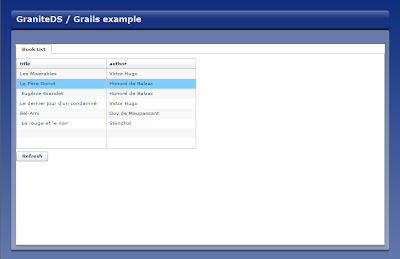


You can check one of the important features of the Tide framework, the entity cache. If you select a row of the grid and click the refresh button, the selection is not lost, meaning that the instances of the books are exactly the same and are just updated with the data coming from the server.

Ok, we now have a list, that would be useful to be able to create or edit books, so we need to add a few buttons.
<?xml version="1.0" encoding="utf-8"?>

<mx:Panel
xmlns:mx="http://www.adobe.com/2006/mxml"
xmlns="*"
width="100%"
label="Book Manager"
creationComplete="list()">

<mx:Metadata>
[Name]
</mx:Metadata>

<mx:Script>
<![CDATA[
import mx.events.ItemClickEvent;
import mx.collections.ArrayCollection;
import mx.controls.Alert;
import mx.binding.utils.BindingUtils;
import org.granite.tide.events.TideUIConversationEvent;
import org.granite.tide.events.TideResultEvent;
import org.granite.tide.spring.Spring;
import org.granite.tide.spring.PagedQuery;

public var dummyBook:Book;

[Bindable] [In]
public var bookListService:PagedQuery;

[Observer("listBook")]
public function list():void {
bookListService.refresh();
}

private function initButtonBar():void {
BindingUtils.bindProperty(bbMain.getChildAt(1), "enabled", dgList, "selectedItem");
}

private function clickHandler(event:ItemClickEvent):void {
if (event.index == 0)
dispatchEvent(new TideUIConversationEvent('New Book', 'editBook'));
else if (event.index == 1 && dgList.selectedItem)
dispatchEvent(new TideUIConversationEvent('Book#' + dgList.selectedItem.id, 'editBook', dgList.selectedItem));
}
]]>
</mx:Script>

<mx:TabNavigator id="nav" width="100%" height="100%">
<mx:VBox label="Book List">
<mx:ButtonBar id="bbMain" creationComplete="initButtonBar()" itemClick="clickHandler(event);">
<mx:dataProvider>
<mx:Array>
<mx:String>New Book</mx:String>
<mx:String>Edit Book</mx:String>
</mx:Array>
</mx:dataProvider>
</mx:ButtonBar>

<mx:DataGrid id="dgList" dataProvider="{bookListService}" width="400" height="200">
<mx:columns>
<mx:DataGridColumn dataField="title"/>
<mx:DataGridColumn dataField="author"/>
</mx:columns>
</mx:DataGrid>

<mx:Button label="Refresh" click="list()"/>
</mx:VBox>
</mx:TabNavigator>

</mx:Panel>

Just adding buttons unfortunately won't be enough, we have to define a controller and UI for the editor panel. Note that the buttons we have defined just dispatch TideUIConversation events. Our application still works, but the new buttons just don't do anything as there is no observer for these events. This shows how the Observer pattern in the Tide framework can help decouple the various parts of the application. We'll see below what conversations mean.
Before that, we have to build the Grails controller to edit books.
grails create-controller BookEdit

grails-app/controllers/BookEditController.groovy :
import org.granite.tide.annotations.TideEnabled

@TideEnabled
class BookEditController {

// The bookInstance property of the controller will be the model that we bind to the Flex view.
Book bookInstance

// The remove method has nothing very particular and is very similar
// to the default delete method of the standard Grails controller scaffolding.
def remove = {
bookInstance = Book.get(params.id)
if (bookInstance)
bookInstance.delete()
}

// The merge and persist method are similar: we get the bookInstance from the params map
// and merge/persist it in the current persistence context.
// Note that we get directly a typed Hibernate detached entity from the params map,
// we'll see below how this map is sent by the client.
// The validation part is a little different from classic Grails controllers, so we'll see it later.
def merge = {
bookInstance = params.bookInstance

if (!bookInstance.validate())
throw new org.granite.tide.spring.SpringValidationException(bookInstance.errors);

bookInstance = bookInstance.merge()
}

def persist = {
bookInstance = params.bookInstance

if (!bookInstance.validate())
throw new org.granite.tide.spring.SpringValidationException(bookInstance.errors);

bookInstance.save()
}
}

And we keep the more complex part for the end.

grails-app/views/BookEdit.mxml:
<?xml version="1.0" encoding="utf-8"?>

<mx:VBox
xmlns:mx="http://www.adobe.com/2006/mxml"
xmlns="*"
width="100%"
label="{create ? "New book" : bookInstance.title}">

<mx:Script>
<![CDATA[
import mx.controls.Alert;
import mx.events.CloseEvent;
import mx.containers.TabNavigator;
import mx.collections.ArrayCollection;
import org.granite.tide.spring.Context;
import org.granite.tide.events.TideResultEvent;
import org.granite.tide.events.TideFaultEvent;


// The Tide context is injected in the component.
// It will be used to manage the conversation.
[Bindable] [In]
public var context:Context;

// We get injected with the main tab navigator with a kind of EL expression.
// We could also have accessed the component with context.bookUI.nav
[Bindable] [In("#{bookUI.nav}")]
public var nav:TabNavigator;

// We get injected with a proxy of the Grails edit controller.
[Bindable] [In]
public var bookEditController:Object;

// We make a two-way binding between the bookInstance to the context.
// So we can set the instance in this component and get it back from
// outside.
[Bindable] [In] [Out]
public var bookInstance:Book;

[Bindable]
private var create:Boolean;


// This observer will be called when someone dispatches the editBook Tide event.
[Observer("editBook")]
public function edit(bookInstance:Book = null):void {
create = bookInstance == null;
if (create) {
this.bookInstance = new Book();
this.bookInstance.chapters = new ArrayCollection();
}
else
this.bookInstance = bookInstance;

// Add itself as a child tab in the main view
if (!nav.getChildByName(this.name))
nav.addChild(this);
nav.selectedChild = this;
}


private function save():void {
bookInstance.title = title.text;
bookInstance.author = author.text;
bookInstance.description = description.text;

// The 'Save' button calls the remote controller and passes it a params map.
// That's how the Grails controller can get the book with params.bookInstance.
if (create)
bookEditController.persist({ bookInstance: bookInstance }, saveResult);
else
bookEditController.merge({ bookInstance: bookInstance }, saveResult);
}

// Result handler for the remote controller call
private function saveResult(event:TideResultEvent):void {
nav.removeChild(this);
// If the book was a new one, trigger a refresh of the list to show the new book.
// Note once again that we don't know here who will handle the raised event.
if (create)
context.raiseEvent("listBook");
// Merges the current conversation context in the global context
// (update the existing entities) and destroys the current conversation context.
context.meta_end(true);
}

private function cancel():void {
nav.removeChild(this);
// The cancel button does not merge the conversation in the global context,
// so all that has been modified in the form is discarded.
context.meta_end(false);
}


public function remove():void {
Alert.show('Are you sure ?', 'Confirmation', (Alert.YES | Alert.NO),
null, removeConfirm);
}

private function removeConfirm(event:CloseEvent):void {
if (event.detail == Alert.YES)
bookEditController.remove({id: bookInstance.id}, removeResult);
}

private function removeResult(event:TideResultEvent):void {
nav.removeChild(this);
context.raiseEvent("listBook");
context.meta_end(true);
}
]]>
</mx:Script>

<mx:Panel>
<mx:Form id="bookForm">
<mx:FormItem label="Title">
<mx:TextInput id="title" text="{bookInstance.title}"/>
</mx:FormItem>
<mx:FormItem label="Author">
<mx:TextInput id="author" text="{bookInstance.author}"/>
</mx:FormItem>
<mx:FormItem label="Description">
<mx:TextArea id="description" text="{bookInstance.description}" width="400" height="50"/>
</mx:FormItem>
</mx:Form>

<mx:HBox>
<mx:Button label="Save" click="save()"/>
<mx:Button label="Delete" enabled="{!create}" click="remove()"/>
<mx:Button label="Cancel" click="cancel()"/>
</mx:HBox>
</mx:Panel>

</mx:VBox>

The last thing is to define this MXML as a Tide-managed conversation component by adding this in a static block in BookUI.mxml.
Spring.getInstance().addComponent("bookEdit", BookEdit, true);

The last parameter set to true indicates that the component will be created in a conversation context. Conversations are a means to have separate component containers that have their own namespace. Each context also has its own entity cache, so changes on entities in a conversation are separate from other conversations.

If you now browse http://localhost:8080/gdsexample/GDSExample.swf, you can check that you can create new books, but if you try to edit an existing book, you encounter the famous LazyInitializationException when clicking 'Save'. Remembering that the Grails controller gets detached objects, and that the chapters collection is defined lazy, it's clear that we cannot apply the default Grails validation to the bookInstance. We have to disable 'deepValidate' for now.

grails-app/controllers/BookEditController.groovy:
def merge = {
bookInstance = params.bookInstance

if (!bookInstance.validate([deepValidate: false]))
throw new org.granite.tide.spring.SpringValidationException(bookInstance.errors);

bookInstance = bookInstance.merge([deepValidate: false])
}
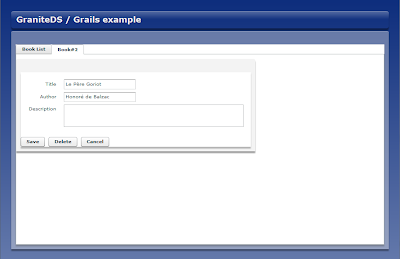


This time everything should work as expected, you can create, update and delete books. However we have left the chapters aside for now, except that it has brought an issue with lazy loading. We would still like to edit the chapters of a book in the form. All we have to do is to add an editable DataGrid in the Book form:
            <mx:FormItem label="Chapters">
<mx:HBox>
<mx:DataGrid id="chapters" dataProvider="{bookInstance.chapters}" editable="true">
<mx:columns>
<mx:DataGridColumn dataField="title"/>
<mx:DataGridColumn dataField="summary"/>
</mx:columns>
</mx:DataGrid>

<mx:VBox>
<mx:Button label="Add"
click="addChapter()"/>
<mx:Button label="Remove"
enabled="{Boolean(chapters.selectedItem)}"
click="removeChapter()"/>
</mx:VBox>
</mx:HBox>
</mx:FormItem>

And the corresponding add/remove event handlers:
            private function addChapter():void {
var chapter:Chapter = new Chapter();
chapter.book = bookInstance;
chapter.title = "";
chapter.summary = "";
bookInstance.chapters.addItem(chapter);
chapters.editedItemPosition = {columnIndex: 0, rowIndex: bookInstance.chapters.length-1 };
}

private function removeChapter():void {
bookInstance.chapters.removeItemAt(chapters.selectedIndex);
}

Now that the chapters collection is always initialized, we could even reactivate the deepValidate option in the BookEditController merge closure.
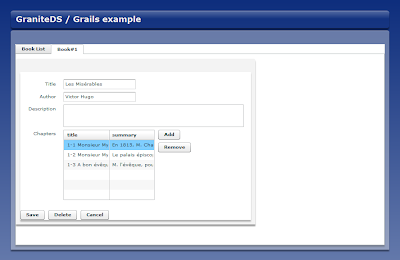


Finally we will add a minimal validation to show the integration with Grails validation. First we have to activate the client handling of the validation errors in a static block of the main application:

grails-app/views/GDSExample.mxml :
    <mx:Script>
<![CDATA[
import org.granite.tide.spring.Spring;
import org.granite.tide.validators.ValidatorExceptionHandler;

Spring.getInstance().addExceptionHandler(ValidatorExceptionHandler);
]]>
</mx:Script>

grails-app/views/BookEdit.mxml :
<mx:VBox
xmlns:mx="http://www.adobe.com/2006/mxml"
xmlns:tv="org.granite.tide.validators.*"
...

<tv:TideEntityValidator entity="{bookInstance}" property="title" listener="{title}"/>
</mx:VBox>
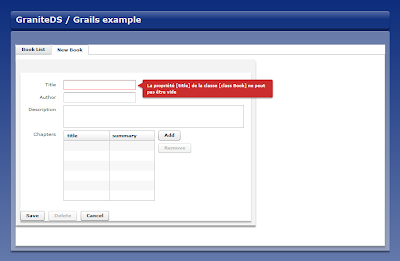


We've just added a validator for the 'title' property, but it's easy to add one for every field. Of course that doesn't make much sense in this case because a purely client-side Flex validator would be more effective, but it can be used anywhere a Grails validation can.

With this simple example, we have already seen many important features of GraniteDS/Tide: the Tide client container with injection and observers, the entity cache, the conversation contexts, lazy loading, data paging and Java server integration. The complete project files can be downloaded here and can just be unzipped in the Grails project folder after create-app and install-plugin.

In a next post, I will show how you can easily add security to the mix, and maybe collaborative data updates between users with the 0.3 plugin.

As always, feedback and suggestions are welcome.

jeudi 20 novembre 2008

Support for Seam 2.1

Support for Seam 2.1 is now in available the trunk and in the latest
GDS nightly builds
(http://www.graniteds.org/bamboo/browse/GDS-SHOTS/latest). Don't
hesitate to give it a try if you are interested to help us testing it
before the stable release.

As a few parts of the API have changed, there are some little
differences of configuration and deployment.

First you will need to use the granite-tide-seam21.jar instead of
granite-tide-seam.jar. The swc library is the same granite-tide-seam.swc.

Most implementation classes are different :

<granite-config scan="true">
<!--
! Use Seam 2.1 based security service.
!-->
<security type="org.granite.seam21.security.Seam21SecurityService"/>

<!--
! Enable Seam components for Tide
!-->
<tide-components>
<component instanceof="org.jboss.seam.security.Identity"/>
<component instanceof="org.jboss.seam.framework.Home"/>
<component instanceof="org.jboss.seam.framework.Query"/>
<component annotatedwith="org.granite.tide.annotations.TideEnabled"/>
</tide-components>
</granite-config>

services-config.xml is exactly the same.

The good news is that you can completely remove all dependencies on
Faces if you don't use it. Thus web.xml can be as simple as :

<web-app version="2.4" xmlns="http://java.sun.com/xml/ns/j2ee"
xmlns:xsi="http://www.w3.org/2001/XMLSchema-instance"
xsi:schemaLocation="http://java.sun.com/xml/ns/j2ee
http://java.sun.com/xml/ns/j2ee/web-app_2_4.xsd">

<display-name>GraniteDS Seam 2.1</display-name>

<!-- Seam -->

<listener>
<listener-class>org.jboss.seam.servlet.SeamListener</listener-class>
</listener>

<filter>
<filter-name>AMFMessageFilter</filter-name>
<filter-class>org.granite.messaging.webapp.AMFMessageFilter</filter-class>
</filter>

<filter-mapping>
<filter-name>AMFMessageFilter</filter-name>
<url-pattern>/graniteamf/*</url-pattern>
</filter-mapping>

<servlet>
<servlet-name>AMFMessageServlet</servlet-name>
<servlet-class>org.granite.messaging.webapp.AMFMessageServlet</servlet-class>
<load-on-startup>1</load-on-startup>
</servlet>

<servlet-mapping>
<servlet-name>AMFMessageServlet</servlet-name>
<url-pattern>/graniteamf/*</url-pattern>
</servlet-mapping>

<welcome-file-list>
<welcome-file>index.html</welcome-file>
</welcome-file-list>
</web-app>


More complete details are here :
http://www.graniteds.org/confluence/display/DOC/3.+Configuration

Remember that if you remove Faces, you will not be able to use
FacesMessages any more (of course) and you will have to use the new
Seam 2.1 StatusMessages API. By default, Tide comes with a basic
implementation of it but it's not necessary to refer explicitly to the
concrete Tide implementation class and you can just use
@In StatusMessages statusMessage;

If you need to use a html view layer side by side with Flex/Tide, this
default TideStatusMessages will be overriden by the view-specific
implementation and you won't have to change anything in the components.

mercredi 19 novembre 2008

GraniteDS Tide for Spring

Tide for JBoss Seam has been available for a while now. The integration is as close as possible mainly because the architecture of the Tide client-side library is heavily inspired by the Seam architecture on the server : stateful components, bijection, conversations...

Spring is different as it promotes a more stateless server architecture and is overall more focused on providing sophisticated low level abilities. Moreover we at graniteds.org have far less experience with it than with JBoss technologies (except Bouiaw who contributed most of the server-side integration).

Consequently the current Tide integration with Spring is maybe not as complete as it could but is already working and provides the most important features :
- Simplified zero configuration remoting
- Managed entities caching on the client
- Data paging supporting remote sorting and filtering
- Transparent loading of lazy collections
- Integration with Hibernate validator
- Tide Flex 3 client framework

Here is a short presentation of the current state of this integration. Most things will work exactly as the Seam version, with very minor differences. Note that most of these features are already present in the GDS 1.1.0 version but will be more polished in the upcoming minor release, with corresponding documentation.

First the inevitable Hello World :

Spring bean (2.5 style with annotations) :

@Service("helloBean")
public class HelloBeanImpl implements HelloBean {
public String sayHello(String name) {
return "Hello, " + name;
}
}


Flex code :

import org.granite.tide.spring.Spring;
import org.granite.tide.spring.Context;

public function init():void {
// The main piece : getting the client context
var tideContext:Context = Spring.getInstance().getSpringContext();
// Triggers the remote call of the 'helloAction' component
tideContext.helloBean.sayHello("Jimi", resultHandler);
}

private function resultHandler(event:TideResultEvent):void {
// Should output 'Hello, Jimi'...
trace(event.result);
}


It's hard to find a difference with the Seam version, for the good reason that there is none, except the name of Tide static factory object (Spring) and of the various packages.

In fact the only client-side impact of using Spring on the server is that you cannot use injection/outjection to transmit data to and from the server beans.
All remote calls will have to be stateless. This seems in line with the Spring application style.


Entity caching

A particular case is when managed entities are transmitted as arguments or return objects of remote calls through Tide.

Spring bean (2.5 style with annotations) :

@Service("personBean")
public class PersonBeanImpl implements PersonBean {

@PersistenceContext
private EntityManager manager;

public Person createPerson(Person person) {
manager.persist(person);
manager.flush();
return person;
}
}


Flex code :

import org.granite.tide.spring.Spring;
import org.granite.tide.spring.Context;

[Bindable]
public var person:Person;

public function createPerson():void {
person = new Person();
person.firstName = "Jimi";
person.lastName = "Hendrix";
tideContext.personBean.createPerson(person, createPersonResult);
}

private function createPersonResult(event:TideResultEvent):void {
person = event.result as Person;
}


There seems to be nothing very special here, except that Tide has merged the content of the original entity with the data from the Person object received from the server. Only the modified properties will then trigger PropertyChangeEvents, not the complete person variable. This is important if you have bound UI components to this particular Person instance.
In fact the whole result handler could even be omitted in this case, because Tide has already modified the person variable before the assignment. There will always be only one instance of an entity with a particular uid in a Tide context (the entity uid is very important for this reason, see corresponding section 'Managed entities' in the docs).


The other particular case is the one of collections :

@Service("personsBean")
public class PersonsBeanImpl implements PersonsBean {

@PersistenceContext
private EntityManager manager;

public List findAllPersons() {
Query q = manager.createQuery("select p from Person p");
return q.list();
}
}


Flex code :

import org.granite.tide.spring.Spring;
import org.granite.tide.spring.Context;

[Bindable] [Out]
public var persons:ArrayCollection;

public function findPersons():void {
person = new Person();
person.firstName = "Jimi";
person.lastName = "Hendrix";
tideContext.personsBean.findAllPersons(findAllPersonsResult);
}

private function findAllPersonsResult(event:TideResultEvent):void {
persons = event.result as ArrayCollection;
// Could have been replaced by tideContext.persons = event.result as ArrayCollection if client framework ([Out] annotation) is not used.
}


Here it is important to assign the result of the remote call to a context variable (either directly or through outjection) during the result handler method if you want to maintain the same collection variable instance between multiple calls to 'findPersons' (very handy when using data binding in DataGrids and only way to correcly use Flex data effects).

The variable assignment will in fact not replace the variable itself but instead merge the received collection content with the content of the existing variable instance. This is (a little) more involving than for entities because there is no uid here that can be used to match the received collection with the existing one (with Seam oujection we could use the name of the context variable).
Of course if you don't make this assignment you will get the correct results but the collection instance will be different (and data bindings will likely be broken also).


Data paging

The good news here is that there is a PagedQuery component in the Tide Spring client library. The bad news is that Spring does not provide an equivalent of the Seam Query component, it will be necessary to build one for each query. It is certainly possible to provide a generic Query component for Spring but this is definitely not in the scope of GDS and it seems that this feature has already been requested by people on the Spring framework.

For now it will be necessary to implement a Spring bean having a method with the following signature :

public Map find(Map filter, int first, int max, String order, boolean desc);


first, max, order and desc are straightforward.
filter is a map containing the parameter values of the query. These values can be set on the client by tideContext.queryBean.filter.parameter1 = value1;
The return object must be a map containing 4 properties :
- firstResult : should be exactly the same as the argument passed in
- maxResults : should be exactly the same as the argument passed in, except when its value is 0, meaning that the client component is initializing and needs a max value. In this case, you have to set the page value (must absolutely be greater than the maximum expected number of elements displayed simultaneously in a table).
- resultCount : number of results
- resultList : list of results

The following code snippet is a quick and dirty implementation :

@Service("people")
@Transactional(readOnly=true)
public class PeopleServiceImpl implements PeopleService {

@PersistenceContext(type = PersistenceContextType.EXTENDED)
protected EntityManager manager;


public Map find(Map filter, int first, int max, String order, boolean desc) {
Map result = new HashMap(4);
String from = "from " + Person.class.getName() + " e ";
String where = "where lower(e.lastName) like '%' || lower(:lastName) || '%' ";
String orderBy = order != null ? "order by e." + order + (desc ? " desc" : "") : "";
String lastName = filter.containsKey("lastName") ? (String)filter.get("lastName") : "";
Query qc = manager.createQuery("select count(e) " + from + where);
qc.setParameter("lastName", lastName);
long resultCount = (Long)qc.getSingleResult();
if (max == 0)
max = 36;
Query ql = manager.createQuery("select e " + from + where + orderBy);
ql.setFirstResult(first);
ql.setMaxResults(max);
ql.setParameter("lastName", lastName);
List resultList = ql.getResultList();
result.put("firstResult", first);
result.put("maxResults", max);
result.put("resultCount", resultCount);
result.put("resultList", resultList);
return result;
}
}


Lazy loading of collections

As with Seam, there is almost nothing to do to have this working.
You will just have to specify the name of the EntityManagerFactory Spring bean that will be used to execute the loading as a property of the Tide destination.

<destination id="spring">
<channels>
<channel ref="my-graniteamf"/>
</channels>
<properties>
<factory>tideSpringFactory</factory>
<entityManagerFactoryBeanName>entityManagerFactory</entityManagerFactoryBeanName>
</properties>
</destination>


Alternatively, it's possible to use a non-JPA persistence manager by defining a persistenceManagerBeanName instead of the entityManagerFactoryBeanName. For example, a plain Hibernate persistence manager is available and can be configured with :
<destination id="spring">
<channels>
<channel ref="my-graniteamf"/>
</channels>
<properties>
<factory>tideSpringFactory</factory>
<persistenceManagerBeanName>tidePersistenceManager</persistenceManagerBeanName>
</properties>
</destination>


And in applicationContext.xml, add the persistence manager and define it as transactional read-only :
<bean id="tidePersistenceManager" class="org.granite.tide.hibernate.HibernateSessionManager"
scope="request">
<constructor-arg>
<ref bean="sessionFactory"/>
</constructor-arg>
</bean>

<aop:config>
<aop:pointcut id="tidePersistenceManagerMethods"
expression="execution(* org.granite.tide.ITidePersistenceManager.*(..))"/>
<aop:advisor advice-ref="tidePersistenceManagerMethodsTxAdvice"
pointcut-ref="tidePersistenceManagerMethods"/>
</aop:config>

<tx:advice id="tidePersistenceManagerMethodsTxAdvice"
transaction-manager="transactionManager">
<tx:attributes>
<tx:method name="*" propagation="REQUIRED" read-only="true"/>
</tx:attributes>
</tx:advice>


Integration with Hibernate Validator

The Tide Flex validators should work with Spring and server validation is enabled by default if Hibernate Validator in found on the classpath.


Conclusion

We now have seen the whole thing.
There is nothing particularly impressive compared to the Seam integration, but this is a good step forward.
More than usually we need feedback from the courageous people who will try this to improve and extend the integration with features more specific to Spring.

mardi 21 octobre 2008

The GDS/Tide Flex 3 framework

Since 1.1 RC3, the Tide framework has been including a not much advertised Flex framework, that is tightly integrated with the whole GDS/Tide data management / service integration functionalities and can completely remove the need for using Cairngorm or PureMVC to develop properly structured Flex applications.

The Tide Flex framework is heavily inspired from JBoss Seam, with an architecture based on stateful components. It borrows the most important concepts of Seam: bijection, events, conversations and is based on Flex 3 custom annotations. In general it shares with Seam the goal to eliminate complexity, thus allows to use simple annotated ActionScript classes with very little configuration.

A Tide application is composed of 3 kinds of components :

- Managed entities (the data model)
- UI view (annotated mxml or ActionScript Flex components)
- Tide components (annotated ActionScript classes)

The overall architecture is centered around the Tide context, which serves as an event bus between the UI view, the Tide components and the server, and as a container for managed entities.

The Tide components contain the core logic of the application. They play the same role on the client as Seam components on the server. Compared to Cairngorm for example, they share similar functionalities with commands and business delegates.
In general, they will have the following activities :
  • observe incoming events (coming from the UI or from the server)
  • execute the business logic of the client application
  • control the state of the UI
  • interact with the server

Let's look at a very simple example of a search list to show how this works :

Seam component (simply extracted from the Seam booking sample) :
@Stateful
@Name("hotelSearch")
@Scope(ScopeType.SESSION)
@Restrict("#{identity.loggedIn}")
public class HotelSearchingAction implements HotelSearching {

@PersistenceContext
private EntityManager em;

private String searchString;
private int pageSize = 10;
private int page;

@DataModel
private List hotels;

public void find() {
page = 0;
queryHotels();
}
...
private void queryHotels() {
hotels = em.createQuery("select h from Hotel h where lower(h.name) like #{pattern} or lower(h.city) like #{pattern} or lower(h.zip) like #{pattern} or lower(h.address) like #{pattern}")
.setMaxResults(pageSize)
.setFirstResult( page * pageSize )
.getResultList();
}
...
public List getHotels() {
return this.hotels;
}

public int getPageSize() {
return pageSize;
}

public void setPageSize(int pageSize) {
this.pageSize = pageSize;
}

@Factory(value="pattern", scope=ScopeType.EVENT)
public String getSearchPattern() {
return searchString==null ? "%" : '%' + searchString.toLowerCase().replace('*', '%') + '%';
}

public String getSearchString() {
return searchString;
}

public void setSearchString(String searchString) {
this.searchString = searchString;
}

@Remove
public void destroy() {}
}

MXML application :

<mx:Application creationComplete="init();">
<mx:Script>
[Bindable]
(1) private var tideContext:Context = Seam.getInstance().getSeamContext();

// Components initialization in a static block
{
(2) Seam.getInstance().addComponents([HotelsCtl]);
}

[Bindable] [In]
(3) public var hotels:ArrayCollection;

private function init():void {
(4) tideContext.mainAppUI = this;
}

private function search(searchString:String):void {
(5) dispatchEvent(new TideUIEvent("searchForHotels", searchString));
}
</mx:Script>

<mx:Panel>
<mx:TextInput id="fSearchString"/>
<mx:Button label="Search" click="search(fSearchString.text);/>

<mx:DataGrid id="dgHotels" dataProvider="{hotels}">
<mx:columns>
<mx:DataGridColumn headerText="Name" dataField="name"/>
</mx:columns>
</mx:DataGrid>
</mx:Panel>
</mx:Application>

Tide component :
import mx.collections.ArrayCollection;

[Name("hotelsCtl")]
[Bindable]
public class HotelsCtl {

[In]
(6) public var hotels:ArrayCollection;

[In]
(7) public var hotelSearch:Object;

(8) [Observer("searchForHotels")]
public function search(searchString:String):void {
(9) hotelSearch.searchString = text;
hotelSearch.find();
}
}
  1. The main application initializes and gets the Tide context.
  2. The application registers the component class HotelsCtl in Tide. This will scan the class and detect the name of the component from the annotation [Name("hotelsCtl")]. Once registered, we will be able to use tideContext.hotelsCtl to instantiate or get a unique instance of the component.
  3. The [In] annotation defines a data binding between the variable named 'hotels' in the Tide context and the variable 'hotels' of the mxml component. It's worth noting that it's consequently also bound to the 'hotels' variable in the server Seam context because Tide synchronizes the client and server context at each remote call.
  4. The application registers itself in the Tide context. This is very important because it allows Tide to intercept the events dispatched by the application, and notify the interested components.
  5. When the user clicks on the search button, the application dispatches a TideUIEvent. This is a common event class that has a simple string type and can hold parameters. In this case, it holds the search string entered by the user.
  6. The component also get injected with the 'hotels' context variable. Note that we will always get the exact same collection instance here than in the mxml UI because the source context variable is the same.
  7. The component get injected with the 'hotelSearch' context variable. We have neither defined a type for this variable nor the name corresponds to a registered Tide component, so Tide will instantiate a common proxy object. Calling any method on this proxy object will trigger a remote call on this method on the server Seam component named 'hotelSearch'.
  8. The component declares an observer method (annotated with Observer). This method will be called when an event of the expected type (here 'searchForHotels') is dispatched on the context. In this case, it will be called when the user clicks on the search button. The method receives the event parameters as arguments.
  9. The component sets the 'searchString' property on the 'hotelSearch' proxy, then calls the 'find' method. Tide will transmit the property updates to the server, and execute them on the Seam component. On the server, Tide will set the searchString property on the Seam component 'hotelSearch', then call the 'find' method. 'hotels' is annotated with @DataModel, so Tide intercepts the outjection and sends the value back to the Flex client along the result of the remote call. On the client, Tide finally merges the 'hotels' collection with the one in the Tide context. The visible result for the user is that the DataGrid content is updated, because it is bound to this context variable.

This simple example demonstrates much of the concepts of the Tide framework. Using the context as a central repository for all elements of the application allows a correct decoupling between the UI layer and the application logic, while keeping the amount of classes and code to a minimum. The framework contains a few more features, notably support for client conversations, but keeps relatively lightweight.

Combined with Seam on the server, it does most of the tedious integration work automatically and helps developers to focus on the real application logic.

The Tide sample projects in the GDS distribution do not fully use the framework because they must support Flex 2 compatibility.
Two Flex 3-only projects graniteds_seam_fx3 and graniteds_seam_booking_fx3 have been adapted to benefit from the Tide framework capabilties and are available in the GDS subversion repository at https://granite.svn.sourceforge.net/svnroot/granite.

A more complete description is available in the documentation here.

As always, feedback is more than welcome.