mardi 3 août 2010

GraniteDS and the current state of Servlet 3

GraniteDS, and in particular the Gravity comet-like push greatly benefit from the asynchronous capabilities of the servlet containers to get a much better scalability than traditional synchronous servlets. It allows the server to handle long-polling http requests without blocking threads unnecessarily: basically long-polling http requests do nothing most of the time and wait for the server to have something to send.

Asynchronous processing has been supported for a long time on the most popular containers (Tomcat, Jetty, JBossWeb) but the implementations depend on the container-specific APIs (CometProcessor for Tomcat, Continuations for Jetty, HttpEvent for JBossWeb). The Servlet 3 API, approved almost a year ago as part of JEE6, is supposed to bring standardisation to this domain. It's very interesting for Gravity because it means that we could have only one implementation for all containers. Unfortunately the only stable container currently supporting Servlet 3 is GlassFish v3 which is the reference implementation, thus we built our experimental support for Servlet 3 in GraniteDS 2.0 on this server.

There are now a few near-stable containers supporting Servlet 3 and we have made some improvements to our servlet 3 support, so it's interesting to have a look now at how GraniteDS behaves on the following containers :
  • GlassFish v3.0.1 (download here)

  • Tomcat 7 beta (download here)

  • Jetty 8 M1 (download here)

  • JBoss 6 M4 (download here)


Gravity can be configured for Servlet 3 with the following snippet in web.xml :
<servlet>
<servlet-name>GravityServlet</servlet-name>
<servlet-class>org.granite.gravity.servlet3.GravityAsyncServlet</servlet-class>
</servlet>
<servlet-mapping>
<servlet-name>GravityServlet</servlet-name>
<url-mapping>/gravityamf/*</url-mapping>
</servlet-mapping>


Thanks to the new servlet 3 APIs, it's also possible to simply add a marker class to configure GraniteDS :
@FlexFilter
public class GraniteConfig {
}

In this case, there is nothing to configure in web.xml, and the Gravity servlet will be mapped on /gravityamf/* by default.

The good news is that the GraniteDS examples (in particular the chat) all work correctly on these containers with this Servlet 3 support. But of course there are a few issues that I'm going to detail.

Tomcat 7 beta

Even if it was functioning relatively correctly, the CometProcessor API in Tomcat 6 was sort of a hack and had lots of issues. It seems to be better with Servlet 3 on Tomcat 7 but there are still problems.
Tomcat requires either a NIO connector or the APR native library to handle asynchronous servlets, and these connectors have quite different behaviours with GDS 2.1.0.GA. None seems to lose messages or drop requests though, but APR triggers lots of strange NullPointerExceptions. We do not know yet if the problem comes from Tomcat or from Gravity (GDS-703).

JBoss 6 M4

Support of Servlet 3 in JBossWeb has been added since JBoss 6 M2. It works much better that Tomcat 7, but there are occasional IllegalStateExceptions that maybe come from Gravity. Notice that you will also need a NIO connector or the APR native library (JBossWeb is more or less a modified Tomcat).
Also note that due to this bug, support for asynchronous servlets will not work with CDI.

Jetty 8 M1

As always with Jetty, everything seems to work just fine without too much hassle. Just download, install and start. We have not found any particular issue yet with GDS 2.1.0.GA.

GlassFish v3.0.1

No big issue detected until now. We have not conducted extensive testing, but Servlet 3 support can be considered stable. Of course for production use, you should run your own stress tests depending on your application.

It's nice to see JEE6 taking shape in the open source space and hopefully all these containers will be released before the end of the year. Support in WebLogic or WebSphere seems a lot more distant, but who knows.

mardi 6 juillet 2010

Flex / Grails CRUD application with GraniteDS, reloaded

Now with Flex 4, Spring Security 3, data push...


It's been almost one year since the last blog entry about the gdsflex plugin. We have just released the version 0.8 of the plugin that brings compatibility with all new releases of the various technologies involved: Grails 1.2/1.3, Flex 4, Spring Security 3... It's time to update the tutorial for this whole new stack.

For the purpose of this article, I'll just write the same boring book application that I've demonstrated before, and simply add additional capabilities: security and data push.

The first important thing before starting is that you now need to install a Flex SDK somewhere and set the FLEX_HOME environment variable to point to its path. It you want to use a Flex 4, that will look like FLEX_HOME = /home/will/flex_sdk_4.
Older versions of the plugin used to embark a full Flex SDK for ease of use, but using FLEX_HOME allows for easier upgrades of the Flex SDK and is more in line with the behaviour of other Grails plugins.

You will also need Grails 1.3.1+ installed and set up (the plugin also works with Grails 1.2.2+ but that could need some minor adjustments in the following steps). Now type from the command line :

grails create-app bookmanager

cd bookmanager

grails install-plugin gdsflex

Part 1 : Define the domain classes and generate a scaffolded Flex application


Just as before, the core of the application is centered on Grails, and more precisely on the domain classes, following usual Grails domain-driven style. Once again we'll start by an Author class.

grails create-domain-class Author

grails-app/domain/bookmanager/Author.groovy
package bookmanager

class Author {

static constraints = {
name(size:0..50, blank:false)
birthDate(format:'DD/MM/YYYY')
picture(nullable:true, widget:'image')
}

String uid

String name

Date birthDate

java.sql.Blob picture
}


And the corresponding controller, here using scaffolding for simplicity :
grails create-controller Author

grails-app/controllers/bookmanager/AuthorController.groovy
package bookmanager

@org.granite.tide.annotations.TideEnabled
class AuthorController {

def index = { redirect(action:list, params:params) }

def scaffold = Author
}


This is not much different from the previous blog examples. Just notice how Grails 1.3 automatically puts domain classes and controllers in a package with the same name than the application.
As always the TideEnabled annotation exposes the controller to the Flex client.

Now we can generate and compile the Flex application :
grails generate-flex-app

grails mxmlc

grails run-app

And go to http://localhost:8080/bookmanager/bookmanager.swf.

You can see a basic working Flex application that allows to create and edit authors. For now the generated app still uses Flex 3 Halo components and not Flex 4 Spark components, but it can perfectly be compiled and run with the Flex 4 SDK.
Future releases of the plugin will generate a Flex 4 Spark application.
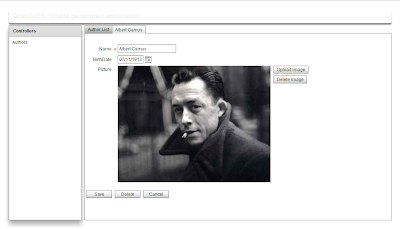


What has happened ?
The generate-flex-app script has generated a basic mxml that handles CRUD operations using the Tide UI builder library in grails-app/view/flex/bookmanager.mxml.
The mxmlc script triggers the Flex compiler to build the application swf in grails-app/views/swf.

The Grails server is now started from this terminal, open a new terminal/command line editor to type the next commands.

Now let's add a couple of other classes with associations.
grails create-domain-class Book

grails create-domain-class Chapter

grails create-controller Book

grails-app/domain/bookmanager/Book.groovy
package bookmanager

class Book {

static constraints = {
title(size:0..100, blank:false)
category(inList:["Fiction", "Non-fiction", "Biography"])
author()
description(size:0..2000, widget:"textArea")
chapters(editable:true)
}

String uid

String title

String category

Author author

Set chapters

String description

static hasMany = [ chapters:Chapter ]
static mapping = {
author fetch:"join"
chapters cascade:"all-delete-orphan"
}
}

grails-app/domain/bookmanager/Chapter.groovy
package bookmanager

class Chapter {

static constraints = {
title(size:0..50, blank:false)
}

String uid

Book book

String title

String summary

static mapping = {
book fetch:"join"
}
}

grails-app/controllers/bookmanager/BookController.groovy
package bookmanager

@org.granite.tide.annotations.TideEnabled
class BookController {

def index = { redirect(action:list, params:params) }

def scaffold = Book
}

An important thing is that ManyToOne associations must be marked fetch:"join" or lazy:false. GraniteDS does not support transparent lazy loading for single ended associations, and most likely never will (it would generate unacceptable network and database traffic, one http request and one SQL query for each uninitialized entity). Lazy collections are supported, so OneToMany and ManyToMany associations do not have to be marked lazy:false.

Once the domain classes written, we can generate their Flex ActionScript 3 equivalents with :
grails gas3


An add a Book entry to the main menu in grails-app/view/flex/bookmanager.mxml.
...
<mx:LinkButton label="Books" width="100%" textAlign="left"
click="mainStack.selectedChild = bookUI" />
...
<ui:EntityUI id="bookUI"
entityClass="{Book}"
width="100%" height="100%"/>
...


I won't get into much details about the EntityUI stuff. It comes from the built-in Tide UI builder library that enables the dynamic client-side scaffolding.
For real applications, you should write your own Flex UI to obtain a really rich and usable interface. The auto generated application can be mostly seen as a quick and dirty prototype.

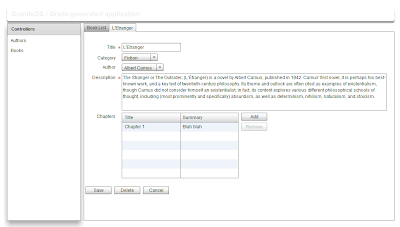
We can now create and edit books, and see how many-to-one and one-to-many associations are displayed in the generated application.

If you eventually tried to add chapters, you will see that it does not work. There are indeed two minor changes to do manually in the AS3 classes to help the UI builder make the link between the associated oneToMany entities: initialize the Chapters collection in the Book.as class, and add a constructor in Chapter.as :

grails-app/views/flex/bookmanager/Book.as
public function Book():void {
chapters = new ArrayCollection();
}

grails-app/views/flex/bookmanager/Chapter.as
public function Chapter(book:Book = null):void {
this.book = book;
}


Once these changes are made, just refresh the browser and check that you can add chapters to your books. Notice how the Gas3 generator and the Flex compiler have been triggered automatically in the background in the running Grails window.

Part 2 : Securing the application


In a real application, it would required that only authenticated users can access enterprise data. Since 0.8, the gdsflex plugin supports the spring-security-core plugin that integrates with Spring Security 3.

Stop the Grails server, and install the plugin with :
grails install-plugin spring-security-core


Then generate the security domain classes Person and Authority (I don't know why, other class names have not worked with the spring-security-core 0.4.1) :
grails s2-quickstart bookmanager Person Authority


The security plugin has generated 3 domain classes : Person, Authority and PersonAuthority. As we have not configured a real database, we are simply going to add a bootstrap script to create default users and roles for our application.

grails-app/conf/Bootstrap.groovy
import bookmanager.Person
import bookmanager.Authority
import bookmanager.PersonAuthority

class BootStrap {

def springSecurityService

def init = { servletContext ->

def user_admin = new Person(username:"admin",
password: springSecurityService.encodePassword("admin"),
enabled:true).save()

def user_user = new Person(username:"user",
password: springSecurityService.encodePassword("user"),
enabled:true).save()

def role_admin = new Authority(description:"Admin",
authority:"ROLE_ADMIN").save()
def role_user = new Authority(description:"User",
authority:"ROLE_USER").save()

new PersonAuthority(person:user_admin, authority:role_admin).save()
new PersonAuthority(person:user_user, authority:role_user).save()
}

def destroy = {
}
}

Now we need to secure access to the application and add a login page. We will make use of the built-in Tide identity component and define a ViewStack to display/hide the login page depending on the current authentication state.

Here's the relevant code to add to grails-app/views/flex/bookmanager.mxml :
<mx:Application
...

import org.granite.tide.spring.Identity;
import org.granite.tide.events.TideResultEvent;
import org.granite.tide.events.TideFaultEvent;

...

[Bindable] [Inject]
public var identity:Identity;

[Bindable]
private var message:String;

private function loginResult(event:TideResultEvent):void {
message = "";
}

private function loginFault(event:TideFaultEvent):void {
message = event.fault.faultString;
}

...

<mx:ViewStack id="appView" selectedIndex="{identity.loggedIn ? 1 : 0}" width="100%" height="100%">
<mx:VBox width="100%" height="100%" verticalAlign="middle" horizontalAlign="center">
<mx:Panel title="Login"
horizontalAlign="center"
verticalGap="0" paddingTop="8" paddingBottom="8"
xmlns:mx="http://www.adobe.com/2006/mxml">

<mx:Form>
<mx:FormItem label="Username">
<mx:TextInput id="username"/>
</mx:FormItem>
<mx:FormItem label="Password">
<mx:TextInput id="password" displayAsPassword="true"
enter="identity.login(username.text, password.text, loginResult, loginFault);"/>
</mx:FormItem>
</mx:Form>

<mx:Label text="{message}"/>

<mx:Button label="Login"
click="identity.login(username.text, password.text, loginResult, loginFault);"/>
</mx:Panel>
</mx:VBox>

<mx:VBox id="mainUI" width="100%" height="100%">
<mx:ApplicationControlBar id="acb" width="100%">
<mx:Label text="GraniteDS / Grails generated application" fontSize="18" fontWeight="bold" color="#f0f0f0"/>
<mx:Spacer width="100%"/>
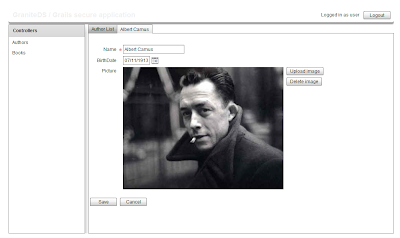
<mx:Label text="Logged in as {identity.username}"/>
<mx:Button label="Logout" click="identity.logout()"/>
</mx:ApplicationControlBar>

...
</mx:VBox>

</mx:ViewStack>
</mx:Application>


There is nothing very sophisticated here, just notice how we make use of the identity.loggedIn property to display the correct UI and identity.login/identity.logout to trigger user login/logout.

You can restart the application, and check that you can log in with the admin/admin and user/user usernames and passwords combinations (and obviously not with others).

Note that we could also have relied on the default html login page of the spring-security-core plugin to secure the application and protect access to the swf itself. That would be the way to go to enable OpenID authentication or any other Web-based authentication model. In this case, you don't necessarily have to add a Flex login page, but you have to indicate to Flex that it has to retrieve the authentication state at startup with something like :
<mx:Application creationComplete="identity.isLoggedIn()" ... />


This can also be used to allow the authentication state to be restored after a browser page refresh.

We can now try to add more advanced authorization filtering. Let's say that we want to forbid deletion of authors by non-administrator users. This requires a few steps :

1. Enable authorization support in grails-app/conf/GraniteDSConfig.groovy


graniteConfig {
springSecurityAuthorizationEnabled = true
springSecurityIdentityClass = org.granite.tide.spring.security.Identity3
}


This tells GraniteDS to enable integration with Spring Security authorizations and defines the Identity3 integration class for Spring Security 3 (the one used in the spring-security-core plugin).

2. Use the Identity component


Usually you will use the Identity component with Flex data binding on component properties such as visible or enabled to hide/disable parts of the UI depending on the user access rights.
For example this will define a button that is displayed only to administrator users :
<mx:Button label="Delete" visible="{identity.ifAllGranted('ROLE_ADMIN')}" includeInLayout="{identity.ifAllGranted('ROLE_ADMIN')}"/>


In our example, it will be a bit more tricky because we use the automatic Tide UI builder. We have to override the default mxml for authors and manually set the data binding for the visible and includeInLayout properties.

grails-app/views/flex/AuthorEdit.mxml
<ui:EntityEdit 
xmlns:mx="http://www.adobe.com/2006/mxml"
xmlns:ui="org.granite.tide.uibuilder.*"
xmlns="*">
<mx:Script>
import mx.binding.utils.BindingUtils;
import org.granite.tide.spring.Identity;

[Inject]
public var identity:Identity;

protected override function layoutForm():void {
super.layoutForm();

BindingUtils.bindProperty(this.buttonBar.getChildAt(1), "includeInLayout", identity,
{ name: 'ifAllGranted', getter: function(identity:Identity):Boolean { return identity.ifAllGranted('ROLE_ADMIN'); } }
);
BindingUtils.bindProperty(this.buttonBar.getChildAt(1), "visible", identity,
{ name: 'ifAllGranted', getter: function(identity:Identity):Boolean { return identity.ifAllGranted('ROLE_ADMIN'); } }
);
}
</mx:Script>
</ui:EntityEdit>


And the override in the main mxml :

grails-app/views/flex/bookmanager.mxml
...            
Spring.getInstance().addComponentWithFactory("bookmanager.author.entityEdit", AuthorEdit,
{ entityClass: Author }, true, true, Tide.RESTRICT_UNKNOWN, null, false);
...


Now if you restart the application, you can check that the Delete button is displayed only when you are logged in as administrator.
Note that user authorizations are retrieved from the server the first time, but are then cached locally, so it's not expensive to add as many ifAllGranted as you wish in the application.

Part 3 : Enabling data push for the application


We can now securely display, create, edit and delete our data. The last advanced feature of GraniteDS that I will show in this post is the data push that allows data updates to be propagated in near real-time to other users.
Once again it involves a few steps :

1. Configure a Tomcat NIO connector


The default Tomcat configuration included in Grails 1.2+ does not use a NIO connector. Using the NIO connector is recommended for GraniteDS data push to provide the better scalability.
It is possible to use the default connector during development but the NIO configuration is interesting (as an aside, thanks to John Fletcher for having taken the time to dig this from the deep of the Grails mailing list, see here: http://www.saltwebsites.com/blog/grails-gds-gravity-guide).
In scripts/_Events.groovy, add this :
import org.apache.catalina.connector.Connector;

eventConfigureTomcat = { tomcat ->

def nioConnector = new Connector("org.apache.coyote.http11.Http11NioProtocol")
nioConnector.port = 8081
nioConnector.setProperty("redirectPort", "8443")
nioConnector.setProperty("protocol", "HTTP/1.1")
nioConnector.setProperty("enableLookups", "false")

tomcat.service.addConnector nioConnector
}


Then you will have to access the application with http://localhost:8081 instead of the standard port 8080.

Note that for production use, it is highly recommended to use the native APR connector, see in the Tomcat documentation here for more information.

2. Enable Gravity/push support in grails-app/conf/GraniteDSConfig.groovy


graniteConfig {
springSecurityAuthorizationEnabled = true
springSecurityIdentityClass = org.granite.tide.spring.security.Identity3

gravityEnabled = true
dataDispatchEnabled = true
}

3. Define a Gravity channel and destination


Then we have to define a Gravity channel and topic in the services-config.xml Flex configuration:

web-app/WEB-INF/flex/services-config.xml:
<services-config>
<services>
<service id="granite-service"
class="flex.messaging.services.RemotingService"
messageTypes="flex.messaging.messages.RemotingMessage">

<destination id="spring">
<channels>
<channel ref="my-graniteamf"/>
</channels>
<properties>
<factory>tideSpringFactory</factory>
<persistenceManagerBeanName>tidePersistenceManager</persistenceManagerBeanName>
</properties>
</destination>
</service>

<service id="gravity-service"
class="flex.messaging.services.MessagingService"
messageTypes="flex.messaging.messages.AsyncMessage">
<adapters>
<adapter-definition id="simple" class="org.granite.gravity.adapters.SimpleServiceAdapter"/>
</adapters>

<destination id="bookManagerTopic">
<properties>
<session-selector>true</session-selector>
</properties>
<channels>
<channel ref="my-gravityamf"/>
</channels>
<adapter ref="simple"/>
</destination>
</service>
</services>

<factories>
<factory id="tideSpringFactory" class="org.granite.tide.spring.SpringServiceFactory">
</factory>
</factories>

<!--
! Declares my-graniteamf channel.
!-->
<channels>
<channel-definition id="my-graniteamf" class="mx.messaging.channels.AMFChannel">
<endpoint
uri="http://{server.name}:{server.port}/{context.root}/graniteamf/amf"
class="flex.messaging.endpoints.AMFEndpoint"/>
</channel-definition>

<channel-definition id="my-gravityamf" class="org.granite.gravity.channels.GravityChannel">
<endpoint
uri="http://{server.name}:{server.port}/{context.root}/gravityamf/amf"
class="flex.messaging.endpoints.AMFEndpoint"/>
</channel-definition>
</channels>
</services-config>

4. Configure the Flex client application to use the topic


grails-app/view/flex/bookmanager.mxml
import org.granite.tide.data.DataObserver;

// Register a data observer component with the name of the topic
Spring.getInstance().addComponent("bookManagerTopic", DataObserver, false, true);
// Binds the subscribe and unsubscribe methods of the component to the application login/logout events
Spring.getInstance().addEventObserver("org.granite.tide.login", "bookManagerTopic", "subscribe");
Spring.getInstance().addEventObserver("org.granite.tide.logout", "bookManagerTopic", "unsubscribe");

5. Configure the controllers to handle dispatch of data updates


Just add the following annotation to all the controllers of the application :
@DataEnabled(topic="bookManagerTopic", params=ObserveAllPublishAll.class, publish=DataEnabled.PublishMode.ON_SUCCESS)


This references a parameter class that allows filtering of which update events can be dispatched. Here we will use an extremely simple filter class that filters nothing :

src/groovy/ObserveAllPublishAll.groovy
import org.granite.tide.data.DataObserveParams;
import org.granite.tide.data.DataPublishParams;
import org.granite.tide.data.DataTopicParams;

public class ObserveAllPublishAll implements DataTopicParams {

public void observes(DataObserveParams params) {
// Define key/value pairs that the client is able to observe
// Will be used to construct the topic selector for the client calling the component
}

public void publishes(DataPublishParams params, Object entity) {
// Define key/value pairs to add in the published message headers
// Will be used to match against the topic selector of the subscribed clients
}
}

Part 4 : Deploy all this as a war in Tomcat


Just run :

grails war

Then rename the generated bookmanager-0.1.war to bookmanager.war and copy it to the Tomcat webapps folder.
Ensure you have correctly installed the native APR connector, start Tomcat, and browse http://localhost:8080/bookmanager/bookmanager.swf, et voilà !


I will stop here for this article. We could go a bit further by adding conflict handling, or per-instance authorizations, but I let this for a future post.
Hopefully this article has shown the range of capabilities of the plugin and of the underlying GraniteDS Flex/Java integration library.

As always, don't hesitate to experiment all this and give your feedback.

jeudi 21 janvier 2010

New in GraniteDS 2.1.0 RC2: more fun with JEE6/CDI

As early testers have discovered, there have a been a few changes in the CDI API that broke the GDS integration since RC1 was released.
GraniteDS 2.1 RC2 now supports the latest CDI specification and Weld RI as included in JBoss 6 M1 and GlassFish v3 final. It can be downloaded here. There have also been improvements in the integration itself :
  • Tide remoting to CDI components (both @Named and type-safe)

  • All standard features of GraniteDS : container security, paging, lazy-loading

  • Support for CDI conversations

  • Support for client-side observers for remote CDI events

  • Client/server synchronization of CDI beans

Il still only works with Weld because of conversation support, but it should be easy to integrate with other implementations by only adapting the CDIInterceptor implementation.
Currently supported containers are JBoss 6.0 M1 and GlassFish v3 final. Some people also managed to get it working in Tomcat 6.

Configuration for JBoss 6 M1

As JBoss 6 does not support servlet 3 yet, the configuration still invoves quite a few files :
  • Add GDS libs in WEB-INF/lib : granite.jar, granite-cdi.jar and granite-hibernate.jar

  • Add AMF (and Gravity if needed) servlets in web.xml

  • Add a WEB-INF/granite/granite-config.xml :
    <granite-config scan="true">
    <security type="org.granite.messaging.service.security.TomcatSecurityService"/>

    <tide-components>
    <tide-component instance-of="org.granite.tide.cdi.Identity"/>
    <tide-component annotated-with="org.granite.messaging.service.annotations.RemoteDestination"/>
    </tide-components>
    </granite-config>

  • Configure the CDI service factory in WEB-INF/flex/services-config.xml :
    <services>
    <service id="granite-service"
    class="flex.messaging.services.RemotingService"
    messageTypes="flex.messaging.messages.RemotingMessage">

    <destination id="cdi">
    <channels>
    <channel ref="graniteamf"/>
    </channels>
    <properties>
    <factory>tideCdiFactory</factory>
    </properties>
    </destination>
    </service>
    </services>
    ...
    <factories>
    <factory id="tideCdiFactory" class="org.granite.tide.cdi.CDIServiceFactory"/>
    </factories>

  • Add an empty beans.xml in WEB-INF

Note that this configuration should also work in Tomcat 6 with a few restrictions.

Configuration for GlassFish v3 and Servlet 3 containers

  • Add GDS libs in WEB-INF/lib : granite.jar, granite-cdi.jar and granite-eclipselink.jar (or the GDS jar corresponding to your JPA provider)

  • Add a configuration class somewhere in your project :
    @FlexFilter(
    tide=true,
    type="cdi",
    factoryClass=CDIServiceFactory.class,
    tideInterfaces={Identity.class}
    )
    public class GraniteConfig {
    }

  • Add an empty beans.xml in WEB-INF

Note that with this kind of simplified configuration, there is no more services-config.xml so it is required to setup the RemoteObject endpoints manually with :
Cdi.getInstance().addComponentWithFactory("serviceInitializer", DefaultServiceInitializer, { contextRoot: "/graniteds-tide-cdi" });

Remoting

Once your application is setup for GraniteDS, you can easily enable remote access from Flex to CDI beans by adding the @RemoteDestination annotation :
@RemoteDestination
public class HelloWorld {

public String hello(String name) {
return "hello" + name;
}
}

If you can live without full type-safety, you can also add a @Named annotation and then access your beans from Flex with :
<mx:Application
xmlns:mx="http://www.adobe.com/2006/mxml"
xmlns="*"
preinitialize="Cdi.getInstance().initApplication()">

<mx:Script>
<![CDATA[
import org.granite.tide.cdi.Cdi;
import org.granite.tide.Component;

[In]
public var helloWorld:Component;
]]>
</mx:Script>

<mx:Button label="Hello" click="helloWorld.hello('Barack')"/>

</mx:Application>

If you don't want string-based references, you can use the gas3 generator to generate a Flex remote proxy for the server bean. Just include the bean class in the gas3 generation path, it will be recognized as a service by the @RemoteDestination annotation. Then you can use type-safe injection in Flex with the new [Inject] Tide annotation :
<mx:Application
xmlns:mx="http://www.adobe.com/2006/mxml"
xmlns="*"
preinitialize="Cdi.getInstance().initApplication()">

<mx:Script>
<![CDATA[
import ...;

[Inject]
public var helloWorld:HelloWorld;
]]>
</mx:Script>

<mx:Button label="Hello" click="helloWorld.hello('Barack')"/>

</mx:Application>

In this case, Tide will do a lookup of the bean by type. If there is more than one implementation, you must add @Named to let Tide choose between them because there is no real equivalent of typesafe annotations in ActionScript 3.

Events

Since RC1, the only change is that gas3 now supports the @TideEvent annotation and is able to generate a corresponding Flex event class.
@RemoteDestination
public class HelloWorld {

@Inject @Any
Event greetingEvent;

public String hello(String name) {
greetingEvent.fire(new GreetingEvent(name));
return "hello" + name;
}
}

<mx:Application
xmlns:mx="http://www.adobe.com/2006/mxml"
xmlns="*"
preinitialize="Cdi.getInstance().initApplication()">

<mx:Script>
<![CDATA[
import ...;

[Inject]
public var helloWorld:HelloWorld;

[Observer(remote="true")]
public function greet(event:GreetingEvent):void {
trace("Greeting to " + event.name);
}
]]>
</mx:Script>

<mx:Button label="Hello" click="helloWorld.hello('Barack')"/>

</mx:Application>

Client/server bean synchronization

This is quite experimental but it can be useful in some cases. It first requires to enable two interceptors in beans.xml :
<beans>
<interceptors>
<class>org.granite.tide.cdi.TideComponentInterceptor</class>
<class>org.granite.tide.cdi.TideBeanInterceptor</alias>
</interceptors>
</beans>

Note that if you have interceptors to handle transactions, they must be setup before Tide interceptors so these Tide interceptors are executed inside the transaction context.
Then you can annotate beans that you want to synchronize with @TideBean and Tide will ensure that any change made on the client is sent to the server and that any change made on the server bean is updated on the client. This synchronization process is not immediate but always delayed until the next remote call.
@TideBean @RequestScoped
@ExternalizedBean(type=DefaultExternalizer.class)
public class CurrentPerson {

private Person person;
private String greeting;

public Person getPerson() {
return person;
}
public void setPerson(Person person) {
this.person = person;
}

public String getGreeting() {
return greeting;
}
public void setGreet(String greeting) {
this.greeting = greeting;
}
}

<mx:Application
xmlns:mx="http://www.adobe.com/2006/mxml"
xmlns="*"
preinitialize="Cdi.getInstance().initApplication()">

<mx:Script>
<![CDATA[
import ...;

[Inject]
public var helloWorld:HelloWorld;

[Inject]
public var currentPerson:CurrentPerson;

private function hello():void {
currentPerson.person = new Person("Barack");
helloWorld.hello();
}

[Observer(remote="true")]
public function greet(event:GreetingEvent):void {
trace("Greeting to " + currentPerson.greeting);
}
]]>
</mx:Script>

<mx:Button label="Hello" click="hello()"/>

</mx:Application>

@RemoteDestination
public class HelloWorld {

@Inject @Any
Event greetingEvent;

@Inject
CurrentPerson currentPerson;

public void hello() {
String name = currentPerson.getPerson().getName();
currentPerson.setGreeting("hello " + name);
greetingEvent.fire(new GreetingEvent(name));
}
}

Besides the fact that this piece of code is as useless and convoluted as it can be, this bean synchronization feature should work in more useful cases.
Note that the interaction is completely typesafe accross Java/CDI and Flex/Tide, that can help avoiding errors much better than when using string-based EL component names.

mercredi 20 janvier 2010

New in GraniteDS 2.1.0 RC2: more improvements in the gas3 generator and simplified configuration

Improvements in the gas3 generator


The previous entry concerning improvements in the gas3 generator already mentioned the new possibility to define a custom EntityFactory in the ant task.

This configuration is now also available in the Eclipse plugin (Project Properties / GraniteDS / Options.


Moreover two new entity factories are also available and make possible to generate validation annotations for the Flex data model.
  • org.granite.generator.as3.HVEntityFactory supports Hibernate Validator 3 annotations

  • org.granite.generator.as3.BVEntityFactory supports Bean Validation (JSR-303) annotations

Here is what a JPA entity class with validation annotations would look like in as3 with one of these factories :
    [Managed]
public class AuthorBase extends AbstractEntity {

private var _name:String;
private var _numPosts:Number;
private var _posts:ListCollectionView;

public static const meta_hasMany:Object = {
posts: Post
};


public function set name(value:String):void {
_name = value;
}
[Length(min="5", max="50", message="{validator.length}")]
public function get name():String {
return _name;
}

[Bindable(event="unused")]
public function get numPosts():Number {
return _numPosts;
}

public function set posts(value:ListCollectionView):void {
_posts = value;
}
public function get posts():ListCollectionView {
return _posts;
}

override meta function merge(em:IEntityManager, obj:*):void {
var src:AuthorBase = AuthorBase(obj);
super.meta::merge(em, obj);
if (meta::isInitialized()) {
em.meta_mergeExternal(src._name, _name, null, this, 'name', function setter(o:*):void{_name = o as String}, false);
em.meta_mergeExternal(src._numPosts, _numPosts, null, this, 'numPosts', function setter(o:*):void{_numPosts = o as Number}, false);
em.meta_mergeExternal(src._posts, _posts, null, this, 'posts', function setter(o:*):void{_posts = o as ListCollectionView}, false);
}
}

override public function readExternal(input:IDataInput):void {
super.readExternal(input);
if (meta::isInitialized()) {
_name = input.readObject() as String;
_numPosts = function(o:*):Number { return (o is Number ? o as Number : Number.NaN) } (input.readObject());
_posts = input.readObject() as ListCollectionView;
}
}

override public function writeExternal(output:IDataOutput):void {
super.writeExternal(output);
if (meta::isInitialized()) {
output.writeObject((_name is IPropertyHolder) ? IPropertyHolder(_name).object : _name);
output.writeObject((_numPosts is IPropertyHolder) ? IPropertyHolder(_numPosts).object : _numPosts);
output.writeObject((_posts is IPropertyHolder) ? IPropertyHolder(_posts).object : _posts);
}
}
}

Two important things are marked in blue :
  • meta_hasMany is a new generated constant that makes possible to know at runtime the type of data in toMany associations. This has two uses : first it forces the compiler to include the associated class by referencing it, then it can be a useful metadata for any client-side framework to know the real type of the associated class at runtime.

  • [Length] has been generated from a Hibernate Validator annotation. Also this can be useful metadata for a client-side framework. And though this is not of much use right now, it sure will be.

Simplified configuration for Spring, Seam


I've already talked about Spring and Seam in a previous post, I'll just mention a few minor improvements and an important change.
In RC1, this was possible to define simple and JMS messaging destinations in the Spring/Seam configuration. This is now supported for ActiveMQ destinations.
It's also possible to define security roles allowed for the Tide destinations :
<graniteds:flex-filter url-pattern=".." tide="true">
<graniteds:tide-roles>
<graniteds:value>ROLE_USER<value/>
</graniteds:tide-roles/>
</graniteds:flex-filter/>

In Spring, there are two new tags :
<graniteds:tide-persistence id="myPersistence" transaction-manager="transactionManager"/>
This declares a Spring persistence manager for Tide lazy-loading that will use the specified Spring transaction manager. Note that is you have only one Spring transaction manager, this is not necessary and Tide will automatically create a default Spring persistence manager.

<graniteds:tide-identity/>
This defines the default Spring security integration bean for Tide. The parameters for integration with Spring security ACL can also be defined here :
<graniteds:tide-identity acl-service="aclService" sidRetrievalStrategy="sidRetrievalStrategy" objectIdentityRetrievalStrategy="oidRetrievalStrategy"/>


The most important thing is the client-side part. In RC1, you had to define a remoteObjectInitializer and build an AMF channel manually. This is now much easier, but take care that there are minor changes to do in your Flex code :
Spring.getInstance().addComponentWithFactory("serviceInitializer", DefaultServiceInitializer, { contextRoot: "/graniteds-tide-spring" });

As you can see, the job is now done by a service initializer class. The DefaultServiceInitializer is suitable in most cases and can be configured with optional server name, port and url mappings for remoting and messaging.
The defaults are :
  • http://{server.name}:{server.port}/graniteds-tide-spring/graniteamf/amf.txt for remoting

  • http://{server.name}:{server.port}/graniteds-tide-spring/gravityamf/amf.txt for Gravity

If you have custom requirements, such a retrieving these urls remotely for an AIR application, you just have to implement IServiceInitializer and add your implementation as a component.

Simplified configuration for Servlet 3 containers


Servlet 3 is very new and is currently supported only in GlassFish v3. However it brings many improvements for framework developers.
Now you just have to define a configuration class annotated with @FlexFilter somewhere in your project and GraniteDS will completely configure itself, there is absolutely nothing else to do. Here is the config class from the example, it is the equivalent of what would have been in granite-config.xml and services-config.xml :
@FlexFilter(
tide=true,
type="ejb",
factoryClass=EjbServiceFactory.class,
ejbLookup="java:global/graniteds-tide-ejb3/{capitalized.component.name}Bean",
entityManagerFactoryJndiName="java:comp/env/jpa",
tideInterfaces={EjbIdentity.class}
)
public class GraniteConfig {

@MessagingDestination(noLocal=true, sessionSelector=true)
AbstractMessagingDestination addressBookTopic;

}

It's hard to think how to do less : just put granite jars in your WEB-INF/lib, create a simple config class and that's all !
Note how Gravity destinations can be defined as fields of this configuration class with @MessagingDestination, @JmsTopicDestination or @ActiveMQDestination.

We'll see how this works when there will be other Servlet 3 containers but this is definitely a great improvement in usability.

mardi 1 décembre 2009

Advanced data features of the Tide framework

Two powerful features of the Tide framework are demonstrated in the example projects but very poorly documented (or not documented at all) : collaborative data updates and concurrent updates conflicts detection/resolution.

Collaborative data updates is the ability to transparently push updates made on an entity by a user to all other interested users. Here is how it works :

  • First tracked entities have to be listened by the DataPublishListener entity listener. If all entities need to be tracked, just put the listener on some AbstractEntity mapped superclass :
    @Entity
    @EntityListeners({DataPublishListener.class})
    public class MyEntity {
    ...
    }

  • Define a Gravity topic to push the updates :
    For example with Seam or Spring, just add this in your configuration file :
    <graniteds:messaging-destination id="myTopic" no-local="true" session-selector="true"/>

    The important thing is to specify the session selector parameter that will allow Tide to store the Gravity/JMS selector in the user client session. It's also useful to set no-local so a client does not receive its own updates. In the classic services-config.xml configuration file, just use :
    <service id="gravity-service"
    class="flex.messaging.services.MessagingService"
    messageTypes="flex.messaging.messages.AsyncMessage">
    <adapters>
    <adapter-definition id="simple" class="org.granite.gravity.adapters.SimpleServiceAdapter"/>
    </adapters>

    <destination id="myTopic">
    <properties>
    <no-local>true</no-local>
    <session-selector>true</session-selector>
    </properties>
    <channels>
    <channel ref="my-gravityamf"/>
    </channels>
    <adapter ref="simple"/>
    </destination>
    </service>
    If transactions or high scalabilty are needed it can work also with a JMS or ActiveMQ topic.

  • All server components annotated with @DataEnabled are intercepted by Tide and the annotation parameters are used to determine the push configuration (topic and selection of pushed clients).
    @DataEnabled(topic="myTopic", params=MyParams.class, publish=PublishMode.ON_SUCCESS)
    public class MyComponent {
    ...
    }

  • PublishMode.ON_SUCCESS indicates that Tide will automatically push the updates for all successful remote calls. PublishMode.ON_COMMIT is not available for now but will be implemented later to get transactional behaviour in JEE environments. The default is PublishMode.MANUAL that requires to call the push method manually with :
    DataContext.publish();

  • The params class defines which clients will receive which updates. It internally uses JMS-like selectors to route messages. Let's see the simplest possible one :
    public class ObserveAllPublishAll implements DataTopicParams {
    @Override
    public void observes(DataObserveParams params) {
    }

    @Override
    public void publishes(DataPublishParams params, Object entity) {
    }
    }
    The observes method indicates which criteria will be used to determine what the client will receive. Here we set no criteria so by default all clients will receive everything. The publishes method indicates the value of the criteria for the update of the specified entity. Here again we set nothing so every update will be pushed to everyone.
    Here is a more interesting example :
    public class AddressBookParams implements DataTopicParams {

    public void observes(DataObserveParams params) {
    params.addValue("user", Identity.instance().getCredentials().getUsername());
    params.addValue("user", "__public__");
    }

    public void publishes(DataPublishParams params, Object entity) {
    if (((AbstractEntity)entity).isRestricted())
    params.setValue("user", ((AbstractEntity)entity).getCreatedBy());
    else
    params.setValue("user", "__public__");
    }
    }
    The observes method indicates that we are interested in getting all updates marked public or made by the current user (all values are appended with a OR operator to the client selector). The publishes method defines the user parameter when the entity is marked as restricted. All this means that a client will receive only public updates or updates made by himself on its own private entities. It's possible to use as many criteria parameters as you want, just ensure that observes and publishes are consistent.

  • Once all this server-side configuration is done, there is still to define a client-side data observer to receive the updates :
    Tide.getInstance().addComponent("myTopic", DataObserver);
    Tide.getInstance().addEventObserver("org.granite.tide.login", "myTopic", "subscribe");
    Tide.getInstance().addEventObserver("org.granite.tide.logout", "myTopic", "unsubscribe");
    This just registers a DataObserver component with the same name as the topic. The events are used to automatically subscribe/unsubcribe the observer on user login/logout.


  • It's a relatively complex setup but once done you don't have anything else to do to automatically get all clients transparently updated when any user modifies something.


    Now that you have this working, you will probably try to update the same entity from two different browsers and see that the result in the database is unpredictable. GraniteDS 2.1 comes with a conflict handling mechanism that should help with these cases. The main requirement is to enable optimistic locking on your JPA entities with a numeric @Version field.

    Then you just have to define a conflict handler on the global context with :
    private function init():void {
    Tide.getInstance().getContext().addEventListener(TideDataConflictsEvent.DATA_CONFLICTS, conflictsHandler);
    }

    private var _conflicts:Conflicts;

    private function conflictsHandler(event:TideDataConflictsEvent):void {
    _conflicts = event.conflicts;
    Alert.show("Someone else has modified the entity you are currently working on.\nDo you want to keep your modifications ?",
    "Modification conflict", Alert.YES | Alert.NO, null, conflictsCloseHandler);
    }

    private function conflictsCloseHandler(event:CloseEvent):void {
    if (event.detail == Alert.YES)
    _conflicts.acceptAllClient();
    else
    _conflicts.acceptAllServer();
    }


    This is relatively straighforward: a conflict event is dispatched whenever conflicts are detected during merge of the pushed updates. Then it's possible either to keep local changes with acceptAllClient, or to get latest server data with acceptAllServer.

    If you don't use data push, it's still possible to use this conflict handling by detecting server-side OptimisticLockException. All Tide service factory install by default a PersistenceExceptionConverter that understands this exception and translates it to something that can be used on the client.
    On the client, just register the corresponding exception handler with :
    Tide.getInstance().addExceptionHandler(OptimisticLockExceptionHandler);
    Then all optimistic lock errors will be considered as local conflicts and will use the previously described conflict handling mechanism. That will allow the end user to keep its change or get the last data from the server.

    Note that this API is not necessarily final so your feedback would be very welcome to improve it or add missing features.

    jeudi 5 novembre 2009

    New in GraniteDS 2.1.0 RC1: early support for JSR-299 / JCDI

    GraniteDS has almost always had support for EJB3 and JBoss Seam. With the advent of JEE6, support for JSR-299 / JCDI is quite a natural evolution and probably a must have in a not so far future.

    So what's in this first implementation :

  • Tide remoting to JCDI Named components

  • All features supported for EJB3: integration with container security, paging, lazy loading

  • Support for JCDI conversations

  • Support for client-side Flex event observers of JCDI typed events


  • Note that for now it will work only with the Weld implementation, as conversation support requires using some non public JSR-299 API.

    Also the supported containers are for now JBoss 5.2 trunk (available here and GlassFish V3 starting from build 70 (available here). It will probably not work in Tomcat for now.

    The GraniteDS distribution contains a graniteds-tide-jcdi example that can be deployed in any of these application servers.

    Configuration

    The configuration is almost the same as for other server framework integrations and consists in five parts :

  • Add the GDS libraries in WEB-INF/lib : granite.jar, granite-jcdi.jar and granite-hibernate.jar (or granite-eclipselink.jar for GlassFish)

  • Add the AMF (and Gravity if needed) servlets in web.xml

  • Add the following granite-config.xml in WEB-INF/granite :
  • <granite-config scan="true">
    <security type="org.granite.messaging.service.security.TomcatSecurityService"/>

    <tide-components>
    <tide-component instance-of="org.granite.tide.jcdi.JCDIIdentity"/>
    <tide-component annotated-with="org.granite.messaging.service.annotations.RemoteDestination"/>
    </tide-components>
    </granite-config>

  • Configure the Tide JCDI service factory in services-config.xml in WEB-INF/flex :
  • <factories>
    <factory id="tideJcdiFactory" class="org.granite.tide.jcdi.JCDIServiceFactory"/>
    </factories>

  • Add an empty beans.xml in WEB-INF

  • Remoting

    Once this is done, add your named JCDI bean and annotate it with @RemoteDestination :

    @Named("helloWorld")
    @RemoteDestination(id="helloWorld")
    public class HelloWorld {

    public String hello(String name) {
    return "hello" + name;
    }
    }

    Then you can easily call it from Flex using Tide remoting and injection :

    <mx:Application
    xmlns:mx="http://www.adobe.com/2006/mxml"
    xmlns="*"
    preinitialize="Jcdi.getInstance().initApplication()">

    <mx:Script>
    <![CDATA[
    import org.granite.tide.jcdi.Jcdi;
    import org.granite.tide.Component;

    [In]
    public var helloWorld:Component;
    ]]>
    </mx:Script>

    <mx:Button label="Hello" click="helloWorld.hello('Barack')"/>

    </mx:Application>

    You can even use typesafe client proxies (e.g. public var helloWorld:HelloWorld) if you have generated them with gas3. Maybe in RC2 we'll try to use completely typesafe service invocation and will not require @Named beans any more.

    Events

    Support for events is relatively similar to what exists for Seam, but with JCDI it uses typesafe events.
    Define your Java and as3 event classes (in the final release it will be possible to generate the as3 event class automatically with gas3) :
    public class GreetingEvent {
    private String name;

    public GreetingEvent(String name) {
    this.name = name;
    }
    public String getName() {
    return name;
    }
    public void setName(String name) {
    this.name = name;
    }
    }
    [RemoteClass(alias="test.app.GreetingEvent")]
    public class GreetingEvent extends AbtractTideEvent {
    public var name:String;
    }

    Fire an event from the server method :
    @Named("helloWorld")
    @RemoteDestination(id="helloWorld")
    public class HelloWorld {

    @Inject @Any
    Event greetingEvent;

    public String hello(String name) {
    greetingEvent.fire(new GreetingEvent(name));
    return "hello" + name;
    }
    }

    Then just declare a remote observer in the Flex application and it will be triggered whenever the event is dispatched during a remote call initiated from Flex.
    <mx:Application
    xmlns:mx="http://www.adobe.com/2006/mxml"
    xmlns="*"
    preinitialize="Jcdi.getInstance().initApplication()">

    <mx:Script>
    <![CDATA[
    import org.granite.tide.jcdi.Jcdi;
    import org.granite.tide.Component;

    [In]
    public var helloWorld:Component;

    [Observer(remote="true")]
    public function greet(event:GreetingEvent):void {
    trace("Greeting to " + event.name);
    }
    ]]>
    </mx:Script>

    <mx:Button label="Hello" click="helloWorld.hello('Barack')"/>

    </mx:Application>


    This is really just an early implementation of this integration and it will be updated for the final release of the JCDI specification and RI.

    Our feeling is that JCDI is a perfect fit for Flex RIAs with an event-driven architecture. JCDI applications looks extremely clean and even JBoss Seam provides a lot more features, they do not necessarily make sense with a RIA front-end.

    Feel free to give some feedback and maybe some ideas for this integration.

    New in GraniteDS 2.1.0 RC1: new features of the gas3 generator

    Typesafe proxies


    One of the very nice new features in GraniteDS 2.1 has been contributed by Francesco Faraone and Saverio Trioni.

    If you have already used RemoteObject or the Tide Component/Object API to access remote services, you most likely already have noticed that neither of these options are typesafe.
    What this means is that you can't have code completion in your Flex IDE, and that you can easily make a mistake in either the remote method name or its arguments.

    With GDS 2.1, the gas3 generator is now able to generate typesafe client proxy classes from Java service classes or interfaces. While it can work with service implementations, it's much better to generate the client proxies from service interface when possible. Let's see how this works with the gas3 ant task :

    <target name="generate.as3" depends="define.gas3"
    description="Generate AS3 beans and proxies for example entities and services">

    <gas3 outputdir="flex">
    <classpath>
    <pathelement location="classes"/>
    <path dir="lib"/>
    </classpath>
    <fileset dir="classes">
    <include name="com/myapp/entities/**/*.class"/>
    </fileset>
    <fileset dir="classes">
    <include name="com/myapp/services/**/*Service.class"/>
    </fileset>
    </gas3>
    </target>


    As you can see, this is no different from generating as3 entity beans, just include the interface classes in the generator fileset.

    It's not the only thing to do, because the generator needs to know that is has to generate a client proxy for our interface and not only an as3 interface. So you have to annotate your service interface with @RemoteDestination(id="myService"). If you use GraniteDS for remoting, that should be generally already the case. Here's an example service interface :

    @RemoteDestination(id="personService")
    public interface PersonService {

    public Person createPerson(Person person);

    public Person modifyPerson(Person person);

    public void deletePerson(Integer personId);
    }


    When generating the client for this interface, you will get a PersonService as3 class that extends RemoteObject and can be used exactly as a RemoteObject :

    var personService:PersonService = new PersonService();
    personService.addOperationListener(personService.modifyPerson, ResultEvent.RESULT, handlerFunction);


    This proxy generator can also be used with the Tide remoting API with the option tide="true". You then will be able to use typesafe service proxies either declared manually :

    Tide.getInstance().addComponent("personService", PersonService)

    PersonService(tideContext.personService).modifyPerson(person, modifyResult)

    Or much easier, using implicit declaration and injection :

    [In]
    public var personService:PersonService;

    personService.modifyPerson(person, modifyResult);


    Note that since the generator requires the annotation @RemoteDestination to identity service interface, it's better to use it than @TideEnabled if you want to use typesafe proxies, even if it requires an unused id attribute.

    The service generation can also be done with the Eclipse builder plugin, in this case just add the service interfaces classes in the 'Java Sources' section of the plugin properties page.


    Generation of flex-config.xml


    Another very frequent cause of errors with AMF objects serialization/deserialization comes from the Flex compiler not including all classes in the compiled SWF because they are not referenced anywhere in the code.
    The fix generally consists in adding dummy variables of the missing type, but this is very tedious and it is very easy to forget one.
    It would be a lot easier if the Flex compiler had an option to always include all classes in a source directory (don't hesitate to vote for the following feature request on the Adobe Flex JIRA) but as long as this is not the case, we felt the need to provide something similar ourselves.

    So there is a new option in the gas3 Eclipse builder plugin that automatically builds a flex-config.xml in the root folder of the project including all as3 files from the current source path.


    Then you just have to add the following compiler option :

    -load-config += flex-config.xml

    And you can say goodbye to problems with missing classes.


    Custom entity factory


    If you use the gas3 ant task, you maybe know that it's already possible to define custom templates for all kinds of generated elements and in particular for entity classes with attributes like entitytemplate="blah.gsp" and entitybasetemplate="blahbase.gsp".

    However your custom templates are still limited to use what is provided by the gas3 entity reflection factory. For example it's not easily possible to generate custom as3 annotation from existing Java annotations.
    To allow this, you can now define a custom implementation of EntityFactory that will build a custom instance of JavaEntityBean where you could parse and store whatever information you need from the Java class.

    For example you could build a HVEntityFactory that reads Hibernate Validator 3 annotations to generate custom constraint annotations in the as3 entity class. You could do this with :

    <gas3 entityfactory="com.myapp.MyEntityFactory"
    entitybasetemplate="file:///C:/myapp/myEntityBase.gsp"/>